
Deferred Expense
An expense that has been incurred but not yet utilized is referred to as a deferred expense.
Unless the underlying goods or services are consumed, the cost is posted as an asset; thereafter, it is expensed. As it will be used up in a year, a deferred expense is initially posted on the balance sheet as a Asset.
1. Configuring Deferred Accounting
- Go to: Accounting > Accounts Setup > Accounts Settings > Deferred Accounting Settings. There are the following:
- Automatically Process Deferred Accounting Entry: Enabled by default.
- Process Deferred Accounting will need to be manually applied to process deferred accounting entries if it is turned off.
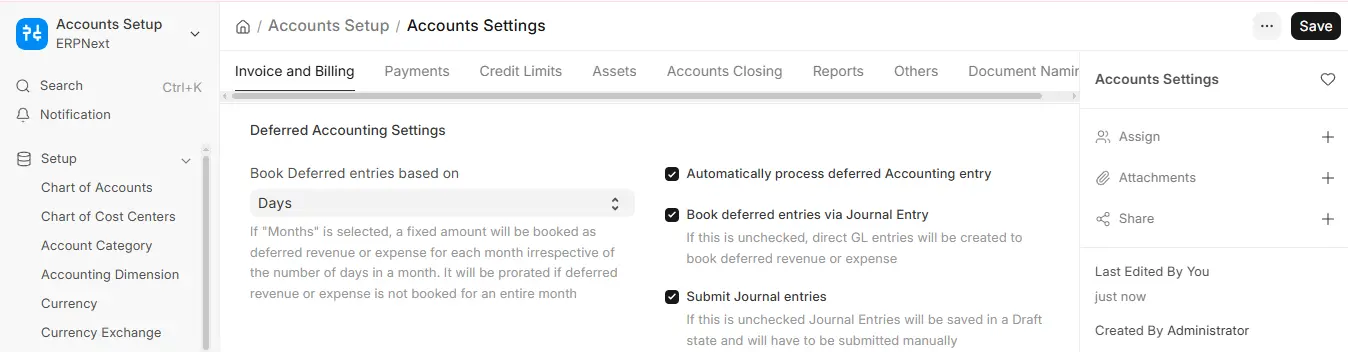
- Book Deferred Entries Based On
- Days (default): Allocates costs based on the number of days in a month.
- For example, $12,000 over 12 months is > $986.30 in a 30-day month and $1,019.18 in a 31-day month.
- Months: Spreads costs evenly across the months.
- Example:, $12,000 over 12 months is > $1,000 per month.
- Days (default): Allocates costs based on the number of days in a month.
- Book Deferred Entries Via Journal Entry
- By default, ledger entries post directly.
- Permit deferred postings to go through Journal Entries.
- Submit Journal Entries
- Applies only when entries are posted via Journal Entry.
- By default, JEs stay in Draft for review.
- Enable to have them submitted automatically.
2. How to Use Deferred Expense
Example
For the rent in May, Unico Plastics pays approximately $10,000 in April. The cost is capitalized in April as Prepaid Rent (Asset) and amortized in May.
Other common deferred expenses include:
- Insurance prepayment;
- Subscription on Internet on annual basis;
- Amortization of intangible assets;
- Depreciation of fixed assets;
- Issuing debt cost
2.1 Item Setup
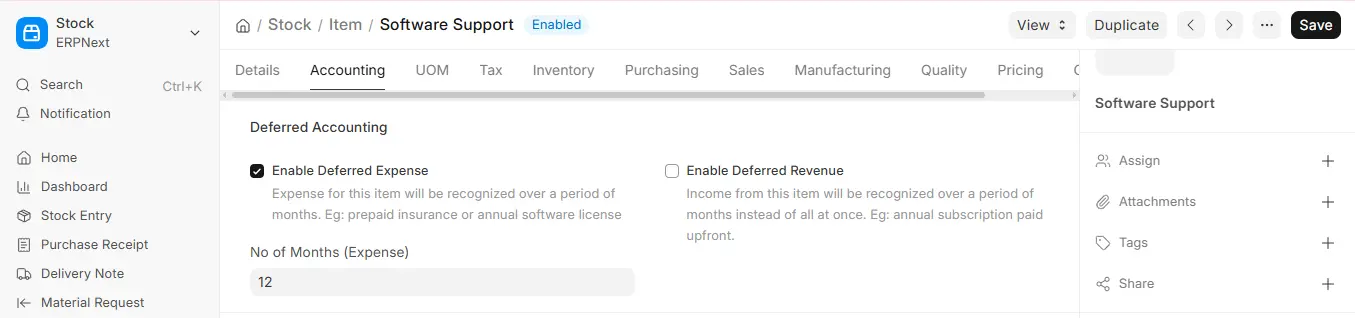
In the Deferred Accounting section of the Accounting tab of the Item Master:
- Enable Deferred Expense.
- Select a Deferred Expense Account (typically a Current Asset) in the Item Defaults table, per company.
- Enter the number of months in No of Months (Expense).
2.2 Purchase Invoice
When a Deferred Expense item is included in a Purchase Invoice:
- The system debits the Deferred Expense Account (Asset) in lieu of the Expense Account. An example would be an upfront payment for an Internet subscription.
2.3 Journal Entry
According to the From Date and To Date in the table Purchase Invoice Item, ERPNext creates Journal Entries automatically at the end of each month.
- Debit: Expense Account
- Credit: Deferred Expense Account

