tasks

Smarter Planning. Better Execution

Capture leads, follow up effectively, and convert opportunities into long-term customers.

Implementation Process

What is ERPNext Project Module?

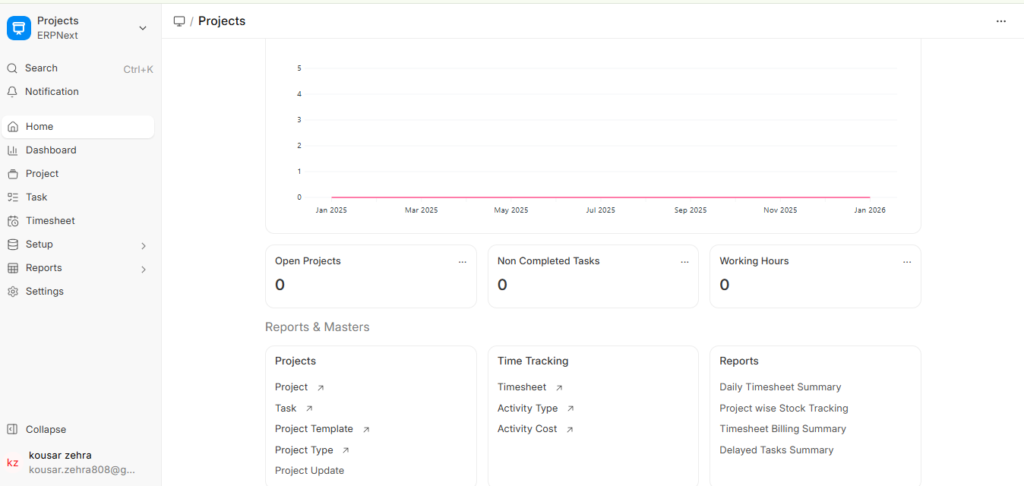
The Projects Module in ERPNext is a complete project management tool that helps companies plan, execute and monitor projects with complete control and visibility. ERPNext is an easy way to track timelines, costs, resources, progress and profits for client projects, internal company tasks, construction site activities, software development, engineering work or service based operations. ERPNext assures that every project stays on schedule and on budget by giving you advanced tools for task management, project planning, time tracking, expense tracking, project budgeting and team collaboration ERPNext provides a simple solution to track timelines, costs, resources, progress, and profits for client projects, internal company tasks, construction site activities, software development, engineering work, or service-based operations. ERPNext helps you keep your projects on track and on budget with powerful task management, project planning, time tracking, expense tracking, project budgeting and team collaboration tools.

Learning About The ERPNext Projects Module

The ERPNext Projects Module gives businesses full control of the management of projects. It gives a systematic way to construct projects, allocate tasks, manage resources, follow up progress and evaluate project profitability.

Some of the main goals are:

ERPNext helps companies reduce delays, distribute work evenly and stay on the same page with real-time dashboards and automated workflows.

Lead Management and Capture

Creating a project in ERPNext is very simple and well organised.


Users can define:

  • Project Name 
  • Project Type 
  • Start and End Dates 
  • Customer Name (for client projects) 
  • Estimated Cost & Budget 
  • Project Milestones 
  • Assigned Team Members 

This information is the basis on which the entire project is planned and executed. It is the single source of truth that everyone can trust.

Tasks for the project and task management

Task Management is at the heart of the ERPNext Projects Module. Users can create unlimited tasks and sub-tasks for level of detail planning.

Each task contains:

  • Task Title 
  • Task Description 
  • Assigned Employee 
  • Priority 
  • Task Duration 
  • Deadline 
  • Task Status (Open, Working, Done) 
  • Notes and attachments

Task-level controls provide clear accountability. Real-time updates enable managers to monitor workload, identify delays, and enhance team productivity. The real-time updates help managers to monitor the workload, identify delays and boost the team’s productivity.

Planning with Gantt Charts and Timelines

ERPNext provides a visual Gantt Chart to help businesses:

  • Plan complete project timelines 
  • View task dependencies 
  • Adjust deadlines 
  • Track progress visually 
  • Detect delays instantl

This timeline view ensures managers stay in control and act before delays become project risks.

Kanban Board for task workflow

The Kanban Board provides a drag-and-drop view of tasks across stages: 

  • To Do 
  • In Progress 
  • Review 
  • Completed

This increases visibility of workflow and team collaboration. Kanban is especially helpful for service teams, software development projects and support operations. Kanban is especially suited for service teams, software development projects, and support operations.

Time Tracking and Timesheets

ERPNext offers built-in Timesheets for recording working hours on tasks. 

Employees can log:

  • Work Hours 
  • Type of Work 
  • Task Executed 
  • Billable / Non-billable Hours 

This supports:

  • Accurate customer billing 
  • Measuring employee productivity 
  • Understanding workload 
  • Tracking project efficiency 
  • Calculating actual project cost 

Time tracking is essential for agencies, software companies, and service-based firms

Project Costing and Budget Management

ERPNext provides complete transparency in project costing by tracking: 

  • Labor Cost 
  • Material Usage 
  • Subcontracting Cost 
  • Travel Expenses 
  • Equipment Usage 
  • Overheads 

The system automatically compares actual project costs with the project budget. This helps businesses not to overspend and keep their finances in check.

Expense Tracking and Billing

All project-related expenses can be recorded in ERPNext: 

  • Employee Expenses 
  • Travel Claims 
  • Consumable Purchases 
  • Subcontracting Invoices 
  • Additional Charges 

These expenses can be converted directly into Sales Invoices for client billing.

Project Milestones and Progress Tracking

ERPNext allows businesses to set project milestones to measure progress. 

Milestones help track:

  • Major deliverables 
  • Stage completion 
  • Progress percentage 
  • Dependencies 

Managers can easily see if the project is ahead of schedule or behind schedule. Real-time dashboards show KPIs such as:

  • Completed Tasks 
  • Pending Tasks 
  • Hours Logged 
  • Budget Used 
  • Progress % 

Attachments, Notes & Documents

ERPNext supports full documentation for projects and tasks: 

  • Contracts 
  • Drawings 
  • BOQs 
  • Site images 
  • Client approvals 
  • Reports 
  • Invoices & receipts

Centralised documentation minimises confusion and enhances team communication

Collaboration and Communication

Projects module includes built-in tools for:

  • Comments 
  • Email Integration 
  • Task Discussions 
  • Mentions (@) 
  • Notifications and Alerts 

Teams stay updated and connected without switching tools.

Project Templates

Companies can create Project Templates for repetitive workflows.

Examples: 

  • Website development 
  • Construction project 
  • Engineering design 
  • Marketing campaign 

Templates save time, ensure consistency and help you remember everything.

Project Profitability Analysis

ERPNext calculates complete project profitability, including: 

  • Total project income 
  • Total expenses 
  • Profit margin 
  • Actual vs. estimated cost 
  • Variance percentage 

Managers learn about which projects are profitable and which projects need work

Working with Other ERPNext Modules

ERPNext Projects works with other ERPNext modules to make a workflow that is connected.

Integrated processes include:

This creates a fully connected project management ecosystem.

Why Every Business Needs ERPNext Projects?

One Fully Connected System

ERPNext Projects Module is a comprehensive and strong project management system that allows businesses to plan better, execute efficiently and deliver on time with complete visibility of costs, tasks and performance.

ERPNext offers the tools any project needs to succeed, including Task Management, Gantt Charts, Kanban Board, Timesheets, Project Costing, Milestones, Expense Tracking, and Project Profitability.

Whether managing construction sites, engineering tasks, service operations, marketing campaigns, or IT development ERPNext ensures full control, strong collaboration, and excellent results

ERPNext Projects Module

Helping Businesses Organize Projects, Track Progress, and Achieve Goals Efficiently

The ERPNext Projects Module is a full project management tool that helps companies plan, carry out, and monitor projects with full control and visibility. ERPNext is a simple way to keep track of timelines, costs, resources, progress, and profits for client projects, internal company tasks, construction site activities, software development, engineering work, or service-based operations.ERPNext makes sure that every project stays on schedule and on budget by giving you advanced tools for task management, project planning, time tracking, expense tracking, project budgeting, and team collaboration

Learning about the ERPNext Projects Module

The ERPNext Projects Module gives businesses full control over how projects are run. It gives you a structured way to create projects, assign tasks, track resources, monitor progress, and measure project profitability.

Some of the main goals are: 

  • Clear project planning 
  • Good task organisation 
  • Accurate time tracking 
  • Clear view of project costs 
  • On-time delivery 
  • Better client satisfaction 


ERPNext helps businesses avoid delays, manage workloads efficiently, and keep everyone aligned through real-time dashboards and automated workflows.

Creating a project in ERPNext is easy and well-organised. Users can define: 

  • Project Name 
  • Project Type 
  • Start and End Dates 
  • Customer Name (for client projects) 
  • Estimated Cost & Budget 
  • Project Milestones 
  • Assigned Team Members 

This information becomes the foundation for planning and executing the entire project. Everyone involved can depend on ERPNext as the single source of truth. 

Tasks for the project and task management

The heart of the ERPNext Projects Module is Task Management. Users can create unlimited tasks and sub-tasks for detail-level planning. 

Each task contains: 

  • Task Title 
  • Task Description 
  • Assigned Employee 
  • Priority 
  • Task Duration 
  • Deadline 
  • Task Status (Open, Working, Done) 
  • Notes and attachments 

Task-level controls ensure clear responsibility. Real-time updates help managers monitor workload, detect delays, and boost team productivity.

Planning with Gantt Charts and Timelines

ERPNext provides a visual Gantt Chart to help businesses: 

  • Plan complete project timelines 
  • View task dependencies 
  • Adjust deadlines 
  • Track progress visually 
  • Detect delays instantly 

This timeline view ensures managers stay in control and act before delays become project risks.

Kanban Board for task workflow

The Kanban Board provides a drag-and-drop view of tasks across stages: 

  • To Do 
  • In Progress 
  • Review 
  • Completed 

This improves workflow visibility and team collaboration. Kanban is especially helpful for service teams, software development projects, and support operations.

Time Tracking and Timesheets

ERPNext offers built-in Timesheets for recording working hours on tasks. 

Employees can log: 

  • Work Hours 
  • Type of Work 
  • Task Executed 
  • Billable / Non-billable Hours 

This supports: 

  • Accurate customer billing 
  • Measuring employee productivity 
  • Understanding workload 
  • Tracking project efficiency 
  • Calculating actual project cost 

Time tracking is essential for agencies, software companies, and service-based firms

Project Costing and Budget Management

ERPNext provides complete transparency in project costing by tracking: 

  • Labor Cost 
  • Material Usage 
  • Subcontracting Cost 
  • Travel Expenses 
  • Equipment Usage 
  • Overheads 

The system automatically compares actual project cost with the project budget. This helps businesses prevent overspending and maintain financial control.

Expense Tracking and Billing

All project-related expenses can be recorded in ERPNext: 

  • Employee Expenses 
  • Travel Claims 
  • Consumable Purchases 
  • Subcontracting Invoices 
  • Additional Charges 

These expenses can be converted directly into Sales Invoices for client billing.

Project Milestones and Progress Tracking

ERPNext allows businesses to set project milestones to measure progress. 

Milestones help track: 

  • Major deliverables 
  • Stage completion 
  • Progress percentage 
  • Dependencies 

Managers can easily see whether the project is ahead or behind schedule. Real-time dashboards display KPIs like: 

  • Completed Tasks 
  • Pending Tasks 
  • Hours Logged 
  • Budget Used 
  • Progress % 

Attachments, Notes & Documents

ERPNext supports full documentation for projects and tasks: 

  • Contracts 
  • Drawings 
  • BOQs 
  • Site images 
  • Client approvals 
  • Reports 
  • Invoices & receipts 

Centralized documentation reduces confusion and improves team communication.

Collaboration and Communication

The Projects Module includes built-in tools for: 

  • Comments 
  • Email Integration 
  • Task Discussions 
  • Mentions (@) 
  • Notifications and Alerts 

Teams stay updated and connected without switching tools.

Project Templates

Companies can create Project Templates for repetitive workflows. 

Examples: 

  • Website development 
  • Construction project 
  • Engineering design 
  • Marketing campaign 

Templates save time, improve consistency, and ensure nothing is missed.

Integration with Other Modules

The ERPNext Projects Module integrates smoothly with: 

  • Accounts (project costing & billing) 
  • Timesheets 
  • Buying 
  • Stock 
  • CRM 
  • Manufacturing 

This creates a fully connected project management ecosystem.

Project Profitability Analysis

ERPNext calculates complete project profitability, including: 

  • Total project income 
  • Total expenses 
  • Profit margin 
  • Actual vs. estimated cost 
  • Variance percentage 

Managers gain insight into which projects are profitable and which need improvement.

Why Use the ERPNext Projects Module?

One Fully Connected System

The ERPNext Projects Module:

The ERPNext Projects Module is a powerful and complete project management system that helps businesses plan better, execute efficiently, and achieve on-time delivery with full visibility of costs, tasks, and performance. 

With features like Task ManagementGantt ChartsKanban BoardTimesheetsProject CostingMilestonesExpense Tracking, and Project Profitability, ERPNext gives businesses the tools needed to succeed in any type of project.

Whether managing construction sites, engineering tasks, service operations, marketing campaigns, or IT development ERPNext ensures full control, strong collaboration, and excellent results