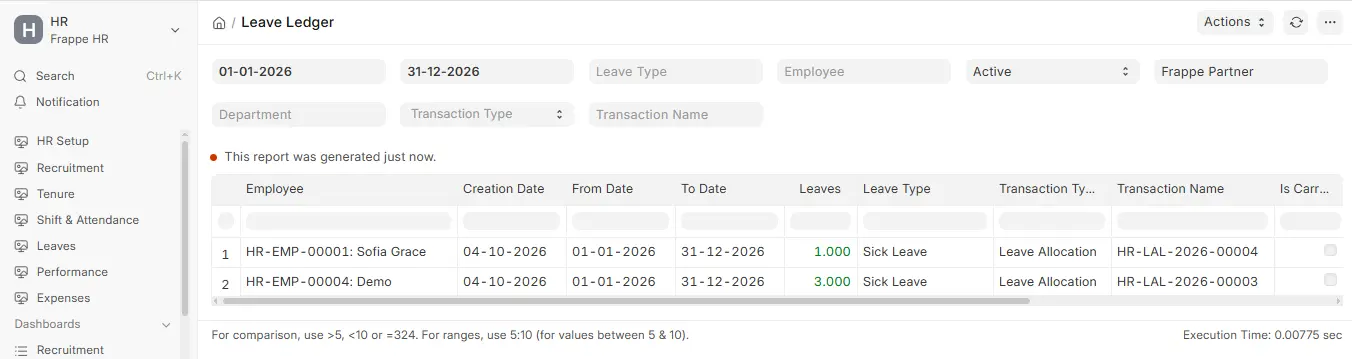
Leave Ledger Report
ERPNext is a great tool that lets you see all of your leave transactions in one location, along with their full Ledger effect. It is a full, chronological record of all modifications to leave, its use, or cashing out. This is the best approach for HR teams, managers, and auditors to keep track of leave transactions in a clear and precise way.
This report shows how the following kinds of transactions have changed things:
- Leave Allocation: This is when an employee gets time off or has time added to their balance according to the leave policy.
- Leave Application: This is when someone asks for time off and gets it. This deducts days from their leave balance.
- Leave Encashment: This is when people obtain cash for their unused leave, which means that there is less leave available. This report goes into a lot of detail regarding a few important things, like:
- Date of Ledger Entry Creation: The day the system made the ledger entry.
- Ledger Transaction Dates (From Date – To Date): The exact dates when the transaction changes the leave balances. Adding, taking away, or changing leaves: This shows you if the item is a credit (an addition), a debit (a consumption), or a change to leave balances.
- Leave Type: This tells you what kind of leave is affected, such as sick leave, vacation leave, or compensating leave.
- Type and Name of Linked Transaction: The file that initiates the procedure, such as Leave Application #LA-0001 or Leave Allocation #LA-0002, so it may be discovered.