
Post Dated Cheque Entry
A Post Dated Cheque Entry is a future-dated cheque. Advance payments are normally made by giving post-dated cheques. The cheque will be honored on the cheque date only.
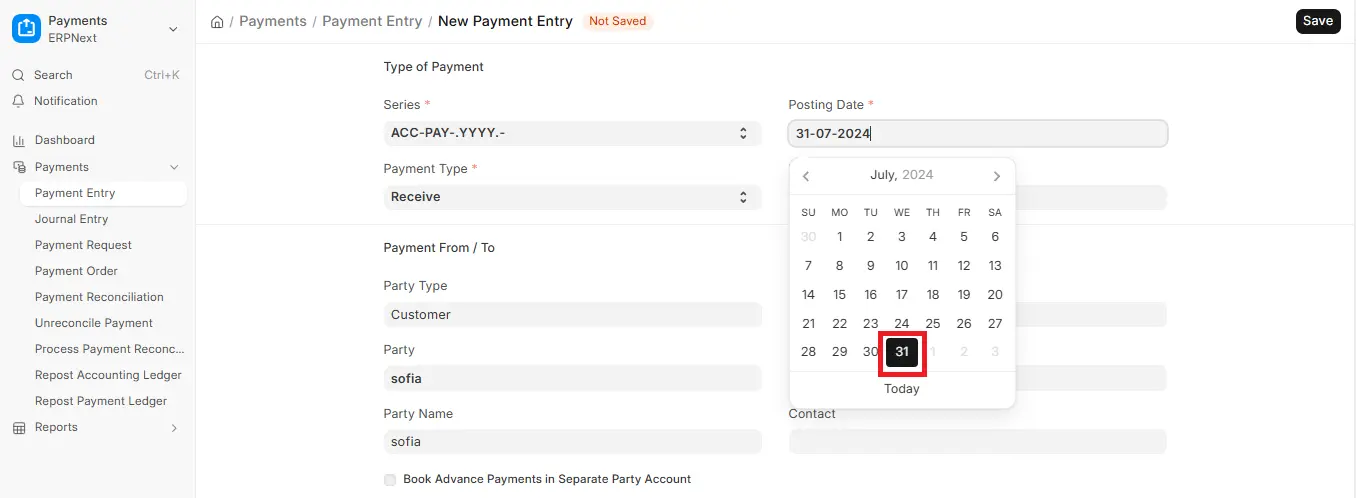
1. New Payment Entry
To make a post-dated cheque payment:
Go to: Accounting > Payments > Payment Entry > Add Payment Entry
2. Set Posting Date
In the Payment Entry form:
- Please fill in the Cheque/Reference Date as the forthcoming date when the cheque was dated (e.g., 31 December 2025).
- Posting Date: if you need the system to post this transaction before the cheque date. Typically, the Posting Date can be on or before the Cheque/Reference Date.
Suggestion: is to use a Posting Date that corresponds to the actual Cheque, but if it falls before this, think about how it will affect cash and bank ledgers.
3. Enter Required Details & Submit
Fill in other required fields:
- Type of Party (Customer or Supplier)
- Party
- Mode of Payment (Cheque)
- Bank Account (Account From/To)
- Cheque/Reference No
- Amount
Click Save after choosing it, then click Submit the Payment Entry.
4. Adjusting or Reconciling the Post-Dated Cheque
- When the time comes, reconcile this Payment Entry with the appropriate invoice or invoices by using the Payment Reconciliation Tool.
- When the cheque clears (i.e., when the cheque date comes): To show clearance, use the Bank Clearance tool (Accounting > Banking), where you enter the “Clearance Date”, or match it with the bank statement in the Bank Reconciliation Tool.
5. Checking Bank Impact / Reports
The amount might already be reflected in the bank account balance of yours (in ERP books) as you might already have posted the Payment Entry. The physical bank may not have still cleared it, however.
- Use the Bank Reconciliation Statement (Report in Accounting) to reconcile the system’s bank balance with the bank statement.
- In order to trace the entry, you can use the GL (General Ledger) reports of the bank account.

