Sales Person Target Allocation
In ERPNext, the Sales Person Target Allocation module enables you to allocate and monitor sales targets for individual sales persons. This enables measurement of the performance of individual sales persons with respect to company Objectives and ensures appropriate tracking of sales activity.
1. Purpose
- To assign monthly, quarterly, or annual sales targets to individual sales persons.
- To compare actual sales with allocated targets.
- To allow sales managers and management to review performance at the individual and team level.
2. How to Access
You can access it by:
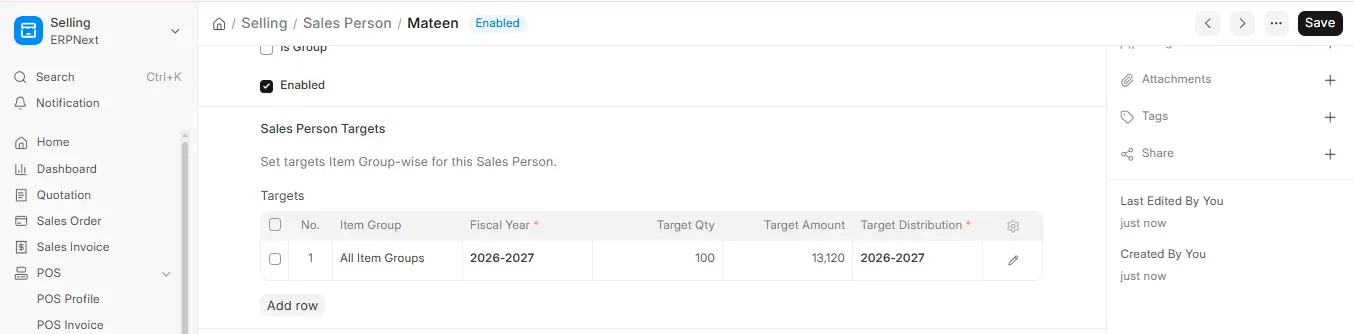
Desktop > Selling > Setup > Sales Person (targets are set in the Sales Person Targets table of each Sales Person; there is no separate “Sales Person Target Allocation” document in v16)
Alternatively, use the search bar and input Sales Person.
3. Creating Sales Person Target Allocation
- Go to: Sales Person and open the sales person.
- Scroll to the Sales Person Targets table and click Add Row.
- Input the following information:
- Item Group: (optional) the item group the target applies to.
- Fiscal Year: Select the fiscal year for which targets will be utilized.
- Target Qty: (optional) the target quantity.
- Target Distribution: Choose a Monthly Distribution that decides how the target is split across the months.
- Target Amount: Fill in the sales target amount for the year.
- Save the Sales Person. Compare actual sales with the targets in the Sales Person Target Variance Based On Item Group report.