
Price List
A list of item prices for purchase, sale, or both is called a price list.
ERPNext enables you to use Price Lists to maintain multiple Selling and Buying prices. These come in Handy when you have varying costs for:
- Geographical region (e.g., according to shipping costs)
- Currency
- Specific customers or territories
Multiple prices for an item may be stored in separate Price Lists depending on variables such as customer, currency, region, etc.
Note: ERPNext stores buying and selling prices independently.
To view Price Lists:
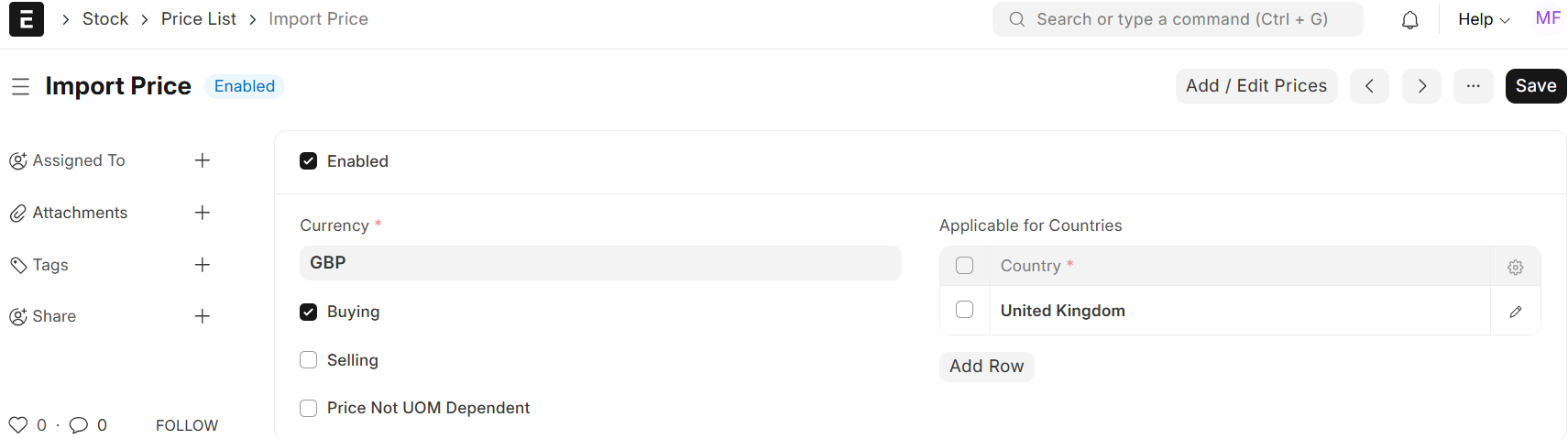
How a Price List Is Used
1. How to Make a Price List:
- Enabled: To make the Price List active, check this box. Disabled lists won’t show up in transactions; uncheck to disable.
- Name: Enter a unique name for the price list, such as “EURO-SELLING-2025.”
- Application for Countries Table: – Utilise the table to specify pricing guidelines for each nation, business, and currency.
To add a new rule, click Add Row.
| Field | |Description |
| Country| Pick the nation in which these rates are applicable. |
| Company| Choose the applicable company. |
| Currency| Choose the currency (e.g., EUR, PKR). Defaults to the company’s currency. |
| Buying | Check if this rule applies to purchase transactions. |
| Selling | Check if this rule applies to sales transactions. |
| Price Not UOM Dependent | Check to ignore Unit of Measure conversions (see example below). |
2. Price Is Independent of UOM
- Unchecked (Default): Price adjusts based on UoM.
- Example: Tomatoes at 10/KG. 1 Box = 10 KG → System calculates 10 × 10 = 100 per Box.
- Checked: Fixed price regardless of UoM.
- Example: $100 per Box, even if Box = 10 KG. System charges 100.
3. Many Rules:
Add more rows to accommodate different combinations like:
- Row 1: Selling = ✔, UOM Independent = ✔, Country = Germany, Company = GmbH, Currency = EUR
- Row 2: Buying = ✔, UOM Independent = ✘, Country = United Kingdom, company = Ltd, Currency = PKR
Default Price Lists for buying and selling are auto-created during ERPNext setup.
Note:
- Price lists can be automatically applied to transactions by assigning them to Customers/Suppliers.
- The country, company, and currency rules are inherited by item prices created under a price list.

