
Stock Closing Entry
The closing stock value and quantity for a desired time span are entered through ERPNext’s Stock Closing Entry (v16+). It comes in handy for making reports more effective and faster related to stocks.
It eliminates the necessity to repeatedly calculate stock balances from the Stock Ledger by acting as a snapshot of your inventory at a given point in time.
1. To create a Stock Closing Entry:
- Go to: Stock → Tools → Stock Closing Entry
- Click New.
- Select:
- Company
- Start and End Dates of the Period (could be a month, half-month, quarter, or year)
- Save and Submit the entry.
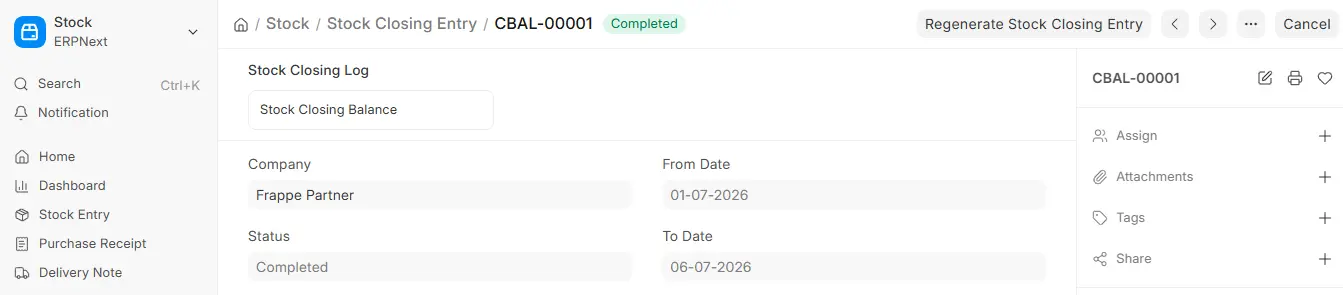
2. What Happens After Submission?
The system will generate the consolidated closing stock information for the Period selected after submission.
It includes:
- The item
- The warehouse
- Batch (if applicable)
- Inventory dimensions (any Project, Cost Centre, etc.)
- Value and Quantity
Stock reports are much faster since this information is stored in a separate table named Stock Closing Balance.
3. Advantages of Using Stock Closing Entry:
- Faster Report Generation: Faster Report Creation Stock reports, like Batch-Wise Balance History and Stock Balance, utilize this pre-calculated data instead of recalculating repeatedly from Stock Ledger Entries.
- Improved Performance: especially beneficial for companies that engage in lots of stock transactions.
- Better Accuracy in Reports: ensures opening balances are accurate using closing balances already posted.
Important Notes:
- Available from ERPNext v16 onwards.
- While not mandatory, it is highly recommended for stock-intensive setups in order to achieve optimal performance.
- They can later be used as a reference point for stock valuations and audits once they have been created.

