
Material Transfer from Delivery Note and Purchase Receipt
Using a Stock Entry with the purpose set to Material Transfer is the most typical approach to move things across warehouses in ERPNext v16. In some business and regulatory scenarios, nevertheless, material transfers must be demonstrated via commercial papers like Delivery Notes or Purchase Receipts instead of internal stock entries.
ERPNext fulfils this demand by allowing you move items with a Delivery Note or Purchase Receipt. This makes sure that stock transfers correctly and that all legal, accounting, and customer-facing paperwork demands are met.
Material Transfer from Delivery Note
Situations:
There are situations in the real world when a material transfer needs to be written down as a Delivery Note instead of a Stock Entry:
- Moving individuals within the organization to project or site locations
For example, when things are moved from a central warehouse to a project site, the project site needs paperwork like a delivery challan to maintain track of things or for an audit.
- Documentation that clients need to see or that the law says they need
In some areas, a delivery document with information about taxes, value, or transportation must be with products every time they move, whether they are going inside or outside the country. Delivery Notes are better for this than Stock Entries.
- Tax on moving things throughout the company
Some rules stipulate that taxes must be calculated and recorded even when money is moved between units or branches. Delivery Notes come with Guidelines for taxes and prices, which makes it easier and clearer to deal with these kinds of transfers.
Because of these problems, ERPNext v16 has a built-in solution to execute Material Transfer with Delivery Notes while still making sure that stock ledger updates are accurate.
Steps
To turn on and use Material Transfer from a Delivery Note, follow the procedures below.
Turn on the Target Warehouse
The Item on the Delivery Note There is a secret field in DocType called Target Warehouse. This field used to be called Customer Warehouse. This parameter tells ERPNext to treat a Delivery Note as an internal transfer of goods instead than a delivery to a customer.
To get this to work:
- Go to the stocks settings.
- Choose the option that says “Allow Material Transfer From Delivery Note and Sales Invoice.”
- Keep the settings as they are.
When you turn on the Target Warehouse field, it will show up in the Delivery Note items.
The consumer you choose must also be from the same company:
- Open the Customer Master.
- Put a tick in the box that says “Is Internal Customer.”
- In the Represents Company field, type in the name of your business.
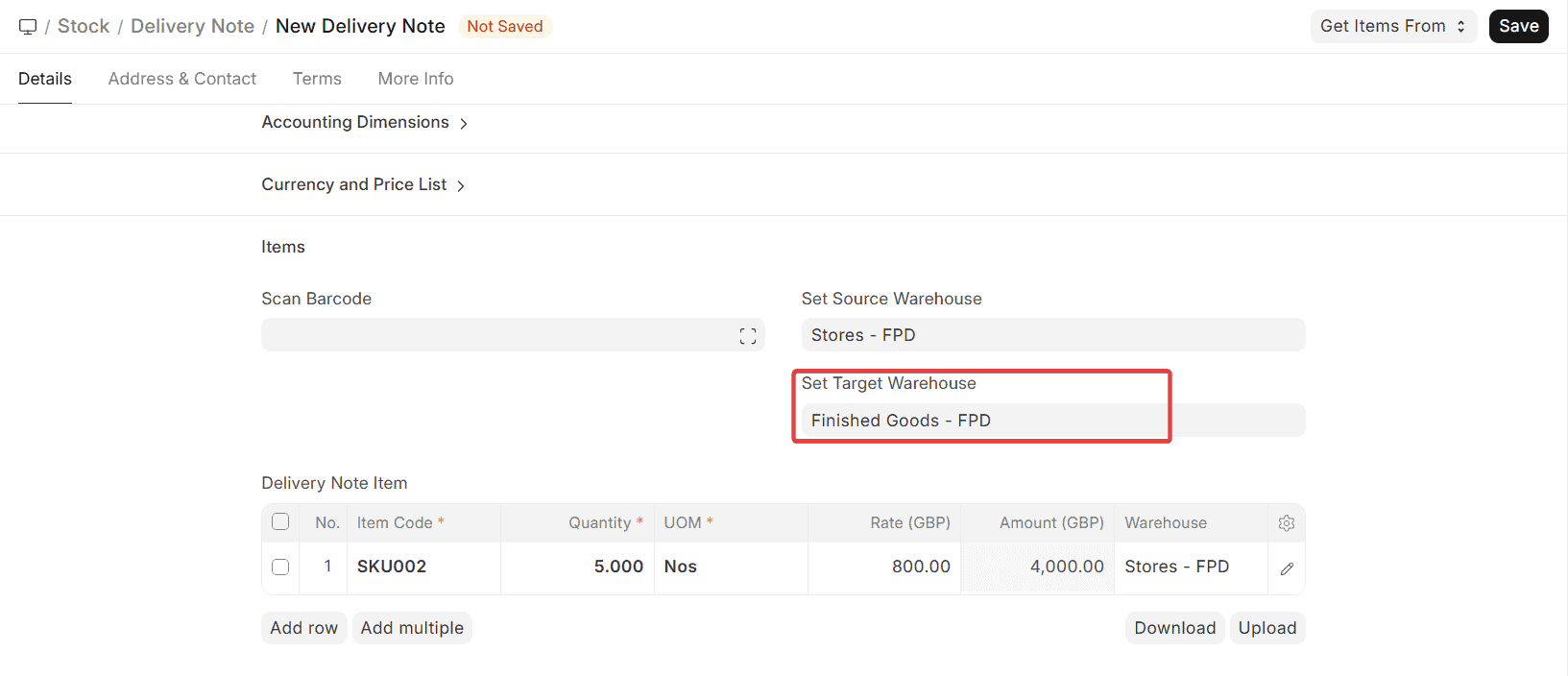
This makes sure that ERPNext sees the transaction as an internal transfer and not a sale to someone outside the company.
Choose Warehouses
When you write a Delivery Note to move things,
- In the “In the Warehouse / From Warehouse” field, pick the Source Warehouse for each item.
This is the warehouse where stock will be sent out. - In the Target Warehouse (Customer Warehouse) field, pick the warehouse where the material will be transferred.
This could be:
- A place to store projects
- A storehouse on the property
- Another branch or warehouse inside
You can add more than one item and designate separate source and target warehouses if you need to, depending on how your firm works.
When you send in the Delivery Note:
- Stock is carried away from the warehouse.
- The Target Warehouse gets more things to sell.
- A Stock Ledger Entry is made for each of the two warehouses.
- The Delivery Note is the official and legally binding document that makes the transfer happen.
Important Notes (ERPNext v16):
- You don’t need a sales invoice unless you wish to bill someone or charge them taxes.
- You can still confirm that the valuation and stock accounting are correct.
- People typically utilise this capability to move stock between branches, move goods for projects, and follow the regulations for logistics.
- When it makes sense, you can apply the same technique for transfers based on sales invoices and purchase receipts.
Moving things from a purchase receipt
In ERPNext v16, the most typical technique to move things across warehouses is to use Stock Entry. But sometimes, such when there are rules, taxes, or transfers between units, internal material transfers must be reported with Purchase Receipt instead of Stock Entry. This is especially true when every time things are moved, taxes, appraisal, or regulatory documentation have to be done.
ERPNext solves this demand by letting you move items with a purchase receipt. This makes sure that both compliance and correct stock accounting are accomplished.
Situations:
There are situations in business and law when a Purchase Receipt must indicate that materials were transferred:
- Transfers that are necessary for legal reasons or to follow the rules
In some locations, every time commodities enter into the country, they have to be taxed, evaluated, or recorded in a fashion that is similar to a purchase. Purchase Receipt is the superior document because Stock Entry doesn’t work with taxes.
- Transferring goods between units or branches
When products are transported between units or branches of the same organisation, a purchase receipt is a legal means to record the transaction.
- Keeping track of purchases made by the company
Even if the supplier is the same company, Purchase Receipt makes it easy to keep track of the landed cost, the valuation rate, and the tax effect.
Taking these things into account, ERPNext v16 lets Purchase Receipts be used as internal papers for moving materials while maintaining the stock ledger and valuation entries correct.
Steps
To set up and use Purchase Receipt for moving materials, you need to perform the following:
Give the supplier warehouse
ERPNext provides a Supplier Warehouse field in Purchase Receipt that works like the Customer Warehouse field in Delivery Notes. It lets you move goods around within the firm.
To make this happen:
- Go to the stocks settings.
- Check the box next to “Allow Material Transfer From Purchase Receipt.” This choice might be next to the Sales Invoice and Delivery Note choices.
- Keep the settings.
This will open the Supplier Warehouse field in the Purchase Receipt Item table.
The supplier you choose must also be from the same company:
- Start the Supplier Master.
- Allow Is an Internal Supplier.
- In the Represents Company field, type in the name of your own business.
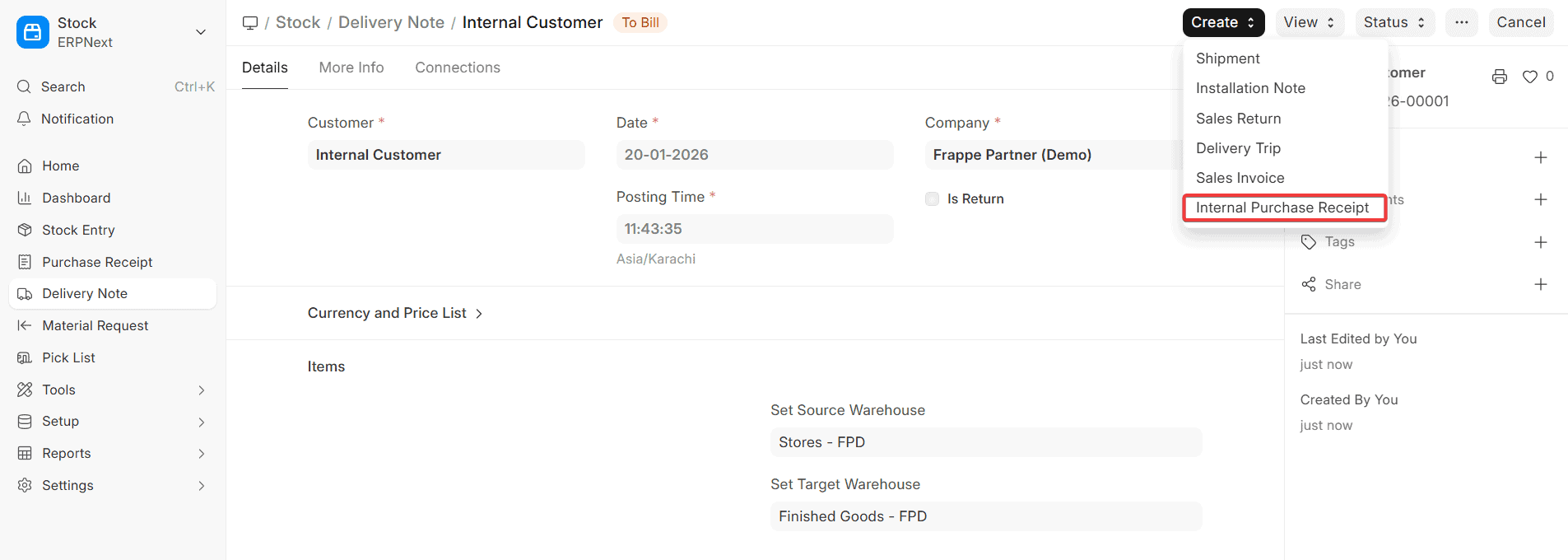
This setting lets ERPNext know that the transaction is an internal transfer and not a buy from outside the firm.
Pick Warehouses
When you make a Purchase Receipt for transferring items:
- Select the Accepted Warehouse for each item.
This is the warehouse where the items will be sent. - In the Supplier Warehouse section, pick the warehouse from which the material is being transferred.
This is the place where stock leaves the warehouse.
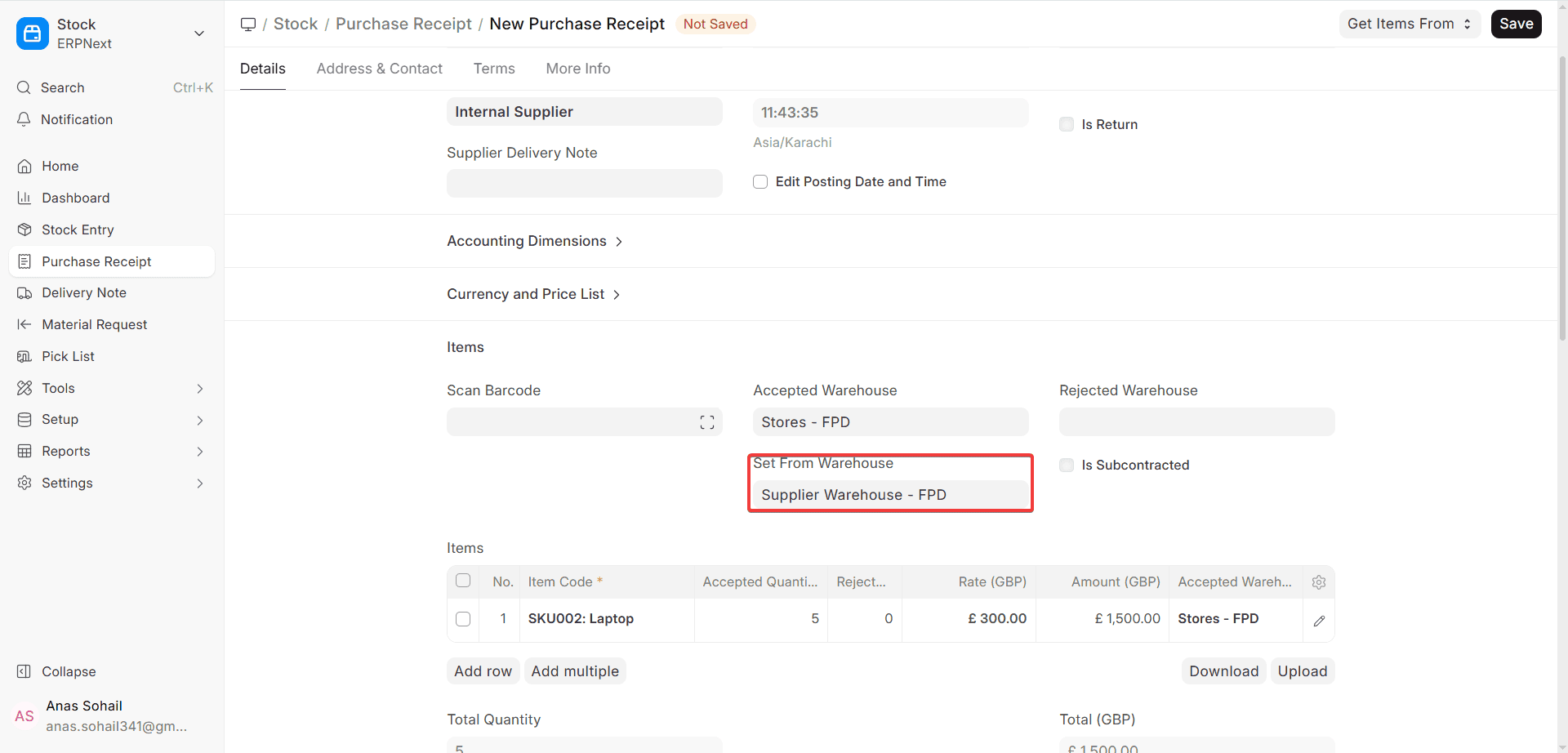
This approach is commonly utilised when you want to make an internal Purchase Receipt from an internal Delivery Note.
- The Delivery Note sends goods from a warehouse.
- The Purchase Receipt sends the identical stock to a separate warehouse.
- Both documents demonstrate movement within the corporation for legal or accounting reasons.
When you send in the Purchase Receipt:
- The Supplier Warehouse picks up stock.
- Putting more stock in the Accepted Warehouse
- Stock Ledger Entries are made for both warehouses.
- According to the requirements for Purchase Receipts, taxes, value, and landed cost (if set up) are added.
Important Notes (ERPNext v16):
- You can’t apply taxes to Stock Entries, but you may to Purchase Receipt-based transactions.
- You don’t need a Purchase Invoice for these transactions unless you want to keep track of your money.
- The logic of the Purchase Receipt is used to figure out the stock value and the valuation rate again.
- This capability is used by a lot of firms that have to follow rules, have more than one location, or deal with taxes.

