
Salary Structure
- The details of an employee’s pay, including how the various components of compensation are broken down, are known as the wage structure.
- Any adjustments made to the components of the salary structure, such as the types of tax exemptions claimed, directly affect the employee’s salary slips and tax calculations.
- Among other things, Frappe HR lets you specify the Earnings and Deductions of a Salary Structure, Payroll Frequency, and Payment Mode.
To view the Salary Structure, visit:
1. Prerequisites
You need to have the following before creating a salary structure:
- Salary Component (the earnings and deductions you will use)
- Company
2. How to Establish a Pay Structure
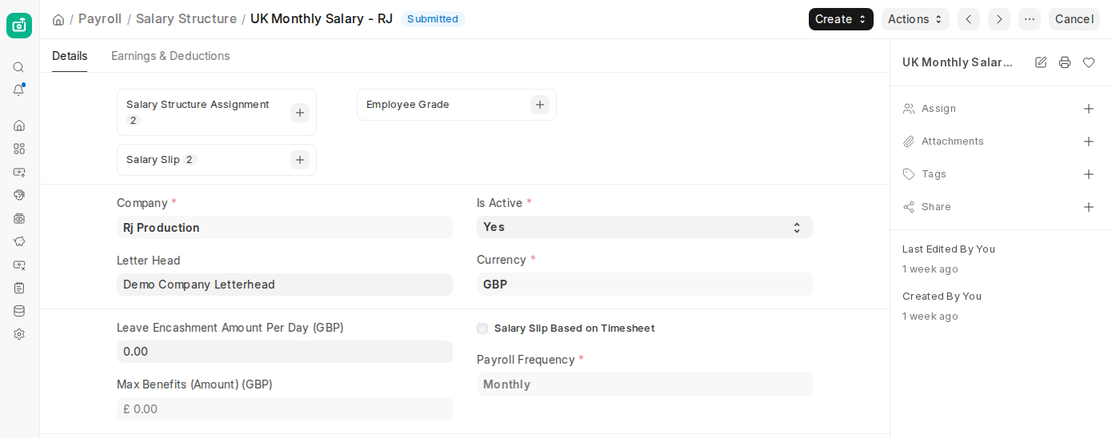
- Click on + Add Salary Structure in the Salary Structure list.
- Put the name of the salary structure here.
- Choose the Company, Currency and Payroll Frequency (Monthly, Fortnightly, Bimonthly, Weekly or Daily) on the Details tab.
- Add the salary components on the Earnings & Deductions tab.
- Save, then Submit.
3. Characteristics
3.1 Deductions and Earnings
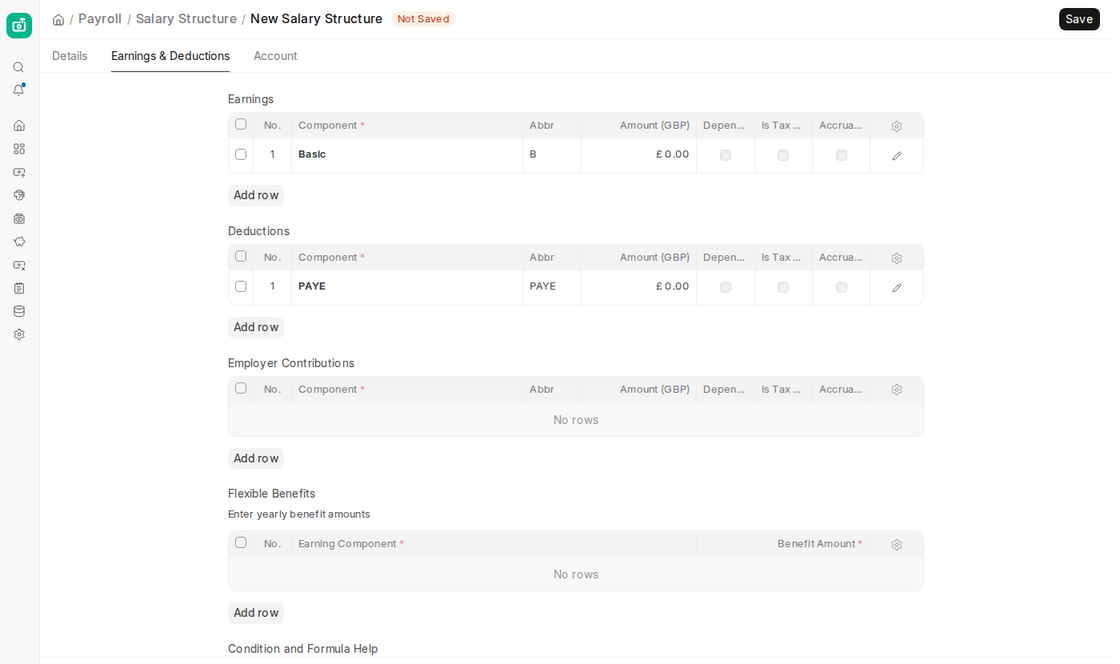
Earnings outline the components of an employee’s salary that they get. These elements, which are added to the employee’s total salary, usually consist of basic, allowances, bonuses, and incentives.
Deductions, on the other hand, outline the salary components that are subtracted from the worker’s overall compensation. Usually, these include the taxes.
The Earnings & Deductions tab in v16 also has an Employer Contributions table, for components of type Employer Contribution (for example the employer’s pension or National Insurance), and a Flexible Benefits table, where you enter yearly benefit amounts against earning components.
In the Component column, choose the Salary Component to create Earnings and Deductions. When creating the Salary Component, enter the Formula/Condition if it wasn’t already given. In the Amount column, you can optionally specify a predetermined amount.
Pay Structure
3.2 Account:
The Account tab allows you to specify the Mode of Payment and Payment Account that will be used to pay the salary.

3.3 Timesheet-based Salary Structure:
The company can pay its employees according to their working hours by using Frappe HR to design the salary structure for the salary slip based on the timesheet.
3.4 Procedure for developing a timesheet-based salary structure:
- Click on + Add Salary Structure in the Salary Structure list.
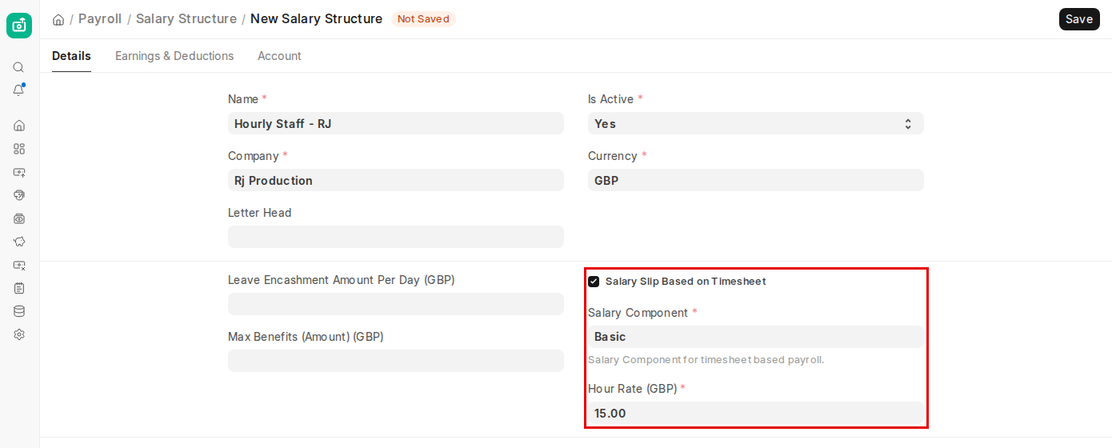
- Tick the Salary Slip Based on Timesheet checkbox on the Details tab. (The Payroll Frequency field is hidden when it is ticked.)
- Choose the Salary Component for timesheet based payroll.
- Enter the Hour Rate.
- The amount for working hours for the chosen Salary Component will be determined based on the rate that was entered.
- Save, then Submit.
- Make a salary slip using timesheets as a guide.
3.5 Leave Encashment Amount Per Day
If an employee has encashable leaves, you can specify the daily leave encashment amount for this specific salary structure in this field. The value of the Salary component will be determined in the Salary Slip based on the ‘Earning Component’ specified in the encashed Leave Type and the amount per day.
3.6 Max Benefits (Amount)
- The maximum yearly amount of flexible benefits for the Salary Structure can be entered in this field. If it is filled in, the total of the yearly amounts in the Flexible Benefits table cannot be more than this amount.
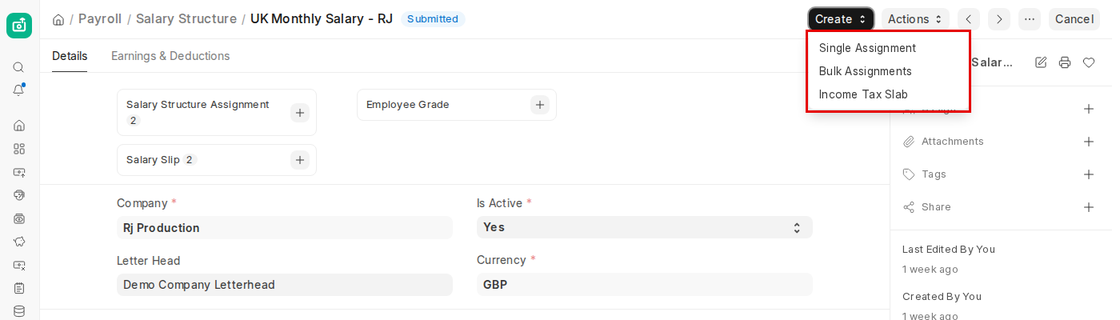
- After all the data has been saved and submitted, you can use the Salary Structure Assignment Tool to allocate the Salary Structure by clicking the Create button and choosing ‘Single Assignment’ to assign one employee or ‘Bulk Assignments’ to assign several employees. The same menu also has ‘Income Tax Slab’.
- By clicking the Actions button and choosing ‘Preview Salary Slip,’ you may also see a preview of the related salary slip for a selected employee.
These elements work together to ensure accurate payroll processing, compliance with statutory requirements, and transparency for both the organization and employees.

