
Selling an Asset
ERPNext Selling an Asset is a straightforward process and is integrated directly with the Sales Invoice module, so that there is proper accounting treatment and complete transaction traceability maintained. This is particularly useful while disposing of assets, either because they have become outdated, have to be upgraded, or are to be liquidated.
How to Sell an Asset
To sell an asset:
- Click the Asset record of the item that you are selling.
- In the upper right corner of the form, click Actions > Sell Asset and enter the Sell Qty (if you sell fewer than the asset quantity, the remaining quantity is split into a new asset). Click Sell.
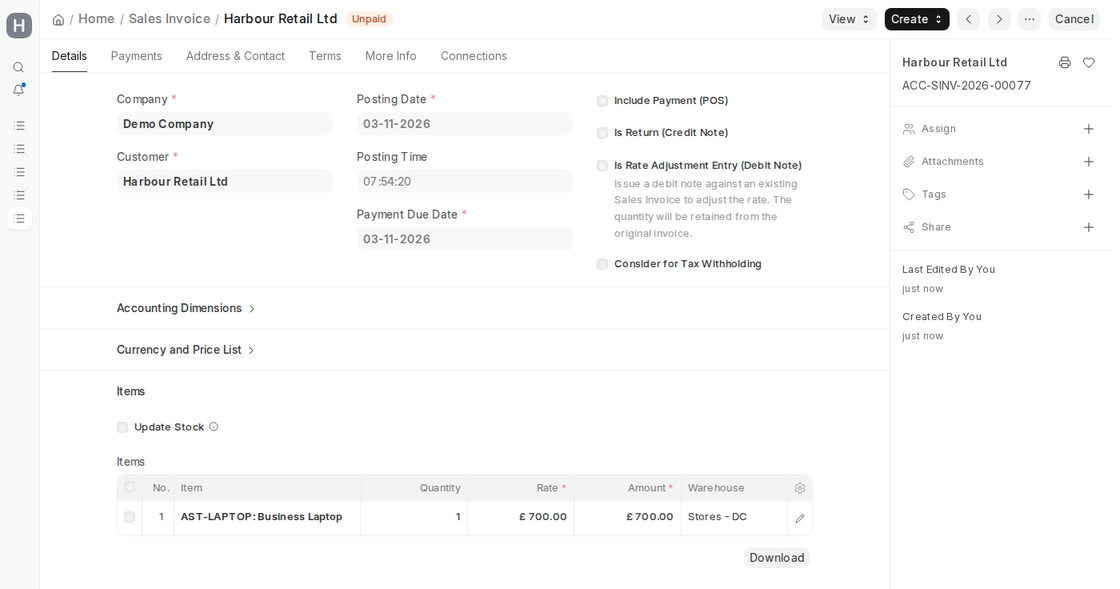
- It will create a new sales invoice form, already having the details of assets in the form. The item’s income account is set to the company’s Gain/Loss on Asset Disposal account.
- In the Sales Invoice form, do the following:
- Customer: Select the buyer of the asset.
- Due Date: Enter the date of payment.
- Add or verify item price information, taxes, and applicable discounts.
- Save and Submit the Sales Invoice to finalize the sale.
Accounting Entries on Asset Sale
The accounting journal entries required to post the accounting impact of the Selling an Asset and Financial effect of the same, are created in ERPNext when the Sales Invoice is posted. The following accounts are impacted by it:
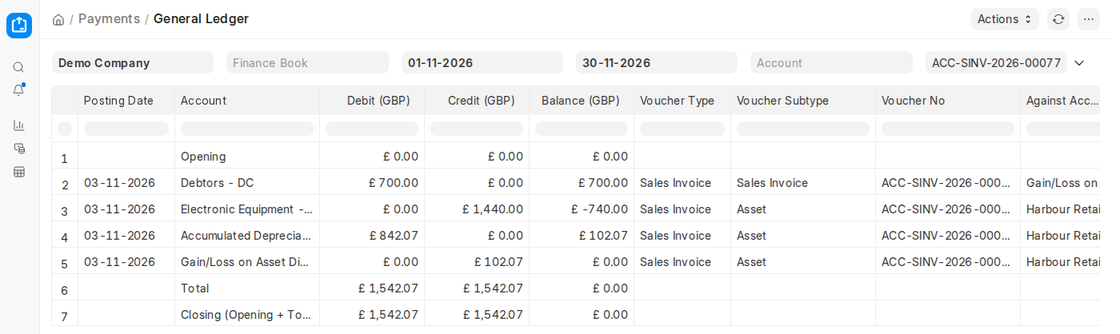
- Dr. Accounts Receivable (Customer/Debtor) → On the basis of overall sales value of the asset (i.e., on the basis of Sales Invoice).
- Cr. Fixed Asset Account → On the basis of original purchase price of the asset (i.e., acquisition cost).
- Dr. Accumulated Depreciation Account → On the basis of overall depreciation accounted on the asset up to the date of sale.
- Cr./Dr. Gain/Loss on Asset Disposal Account → The system calculates the net gain or loss as the difference between:
- Sale price
- Net book value (purchase price – accumulated depreciation) → A gain is credited and a loss is debited to the Gain/Loss on Asset Disposal account defined in the Company master.
Example: If you purchased a computer for $2,000 and it depreciated by $1,200 in value over time, and you sell it for $900, the net book value would be $800. ERPNext will record a $100 gain on disposal. In the screenshot above, a laptop costing £1,440 with £842.07 accumulated depreciation (net book value £597.93) was sold for £700, so a gain of £102.07 was recorded.
Further Notes:
- The Asset Status is set to “Sold” automatically on successful invoice submission.
- On submission, ERPNext first books depreciation up to the date of sale, and no further depreciation is posted once the asset is sold.
- You can directly link the corresponding Sales Invoice and Journal Entry from the Asset record for audit and reconciliation purposes.