Training Program
- A training program is a planned sequence of activities that instruct workers or others in certain skills, areas of knowledge, or competencies.
- It assists businesses in enhancing the ability and performance of their employees and ensures training activities align with their company objectives.
- In Frappe HR, you can create a Training Program and subsequently schedule a series of Training Events under it.
- Having all the training data together means that it is simpler to prepare, organize, and monitor training activities over time.
Go to the Training Program by going to:
Home > Human Resources > Training > Training Program
1. How to Make a Training Plan
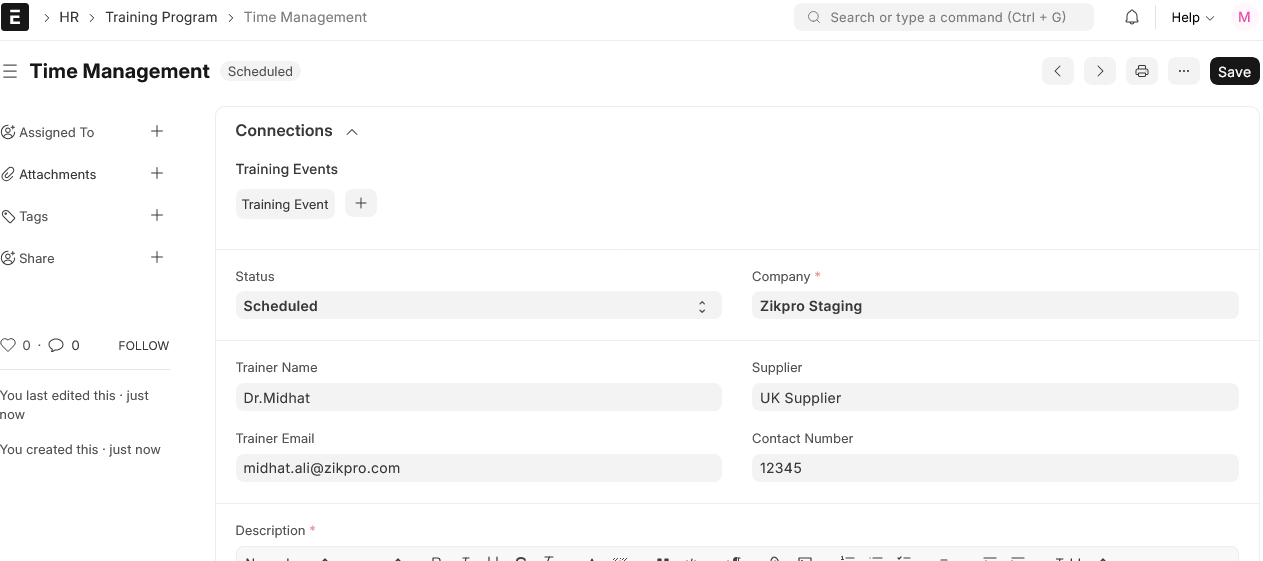
- In order to make a new record of training, click New in the training program list.
- Ensure that you provide the name of the training program clearly so that individuals understand what it is about and what skills it is supposed to impart.
- Complete the trainer’s name, email, and phone number so that you can reach them easily.
- You can select the Supplier (optional) to track vendor information for future use if a third-party specialist is conducting the training.
- You can enter a brief Description of the Training Program in the Description box (optional) to provide a summary or outline its objectives.
- The initial status of the training program is “Scheduled.” You can change it to “Completed” or “Cancelled” later as the case may be.
- Once you save the Training Program, you can begin creating Training Events and associate them with the same program for implementation.
- This ensures that all the training plans are documented in a single place and can be easily followed from planning to delivery.