
Activity Cost
An Activity Cost in ERPNext captures the per-hour billing and costing rate for every employee, assigned to a particular Activity Type. This allows proper computation of labor costs and billing for every time entry in a project.
These rates are automatically pulled whenever employees enter time in timesheets, so that project expenditures and billing totals incorporate the proper rate per activity and individual.
How to access Activity Cost:
1. Creating an Activity Cost
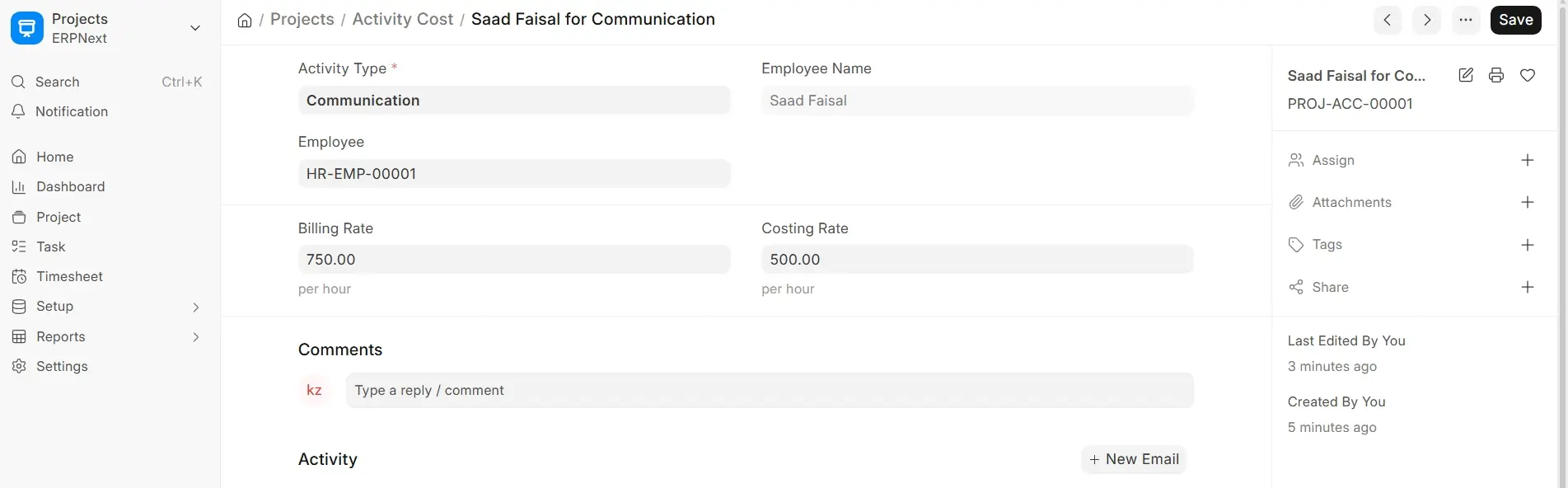
- Go to the Activity Cost list and click New to establish a new rate scheme.
- Choose the Employee whose rates you’re establishing.
- Choose the applicable Activity Type (e.g., Development, Testing, Communication).
- Enter the Costing Rate (the internal hourly cost) and Billing Rate (the rate billed to the customer).
- Click Save.
ERPNext validates the form to stop duplicate rate entries for the same pair of employee-activity, thus maintaining data consistency.
You may also create an Activity Cost while navigating through the Activity Type master list. Clicking on an activity type now has an option to set employee-specific rates through a default shortcut. This makes data entry easier and keeps all relevant actions of rate-setting within reach.
You can use Data Import to import or export Activity Cost entries for bulk Setup.

