
Asset Value Adjustment
The Asset Value Adjustment functionality in ERPNext provides organizations with the facility to post sudden or unexpected value changes of an asset. It comes in handy in cases where an asset suffers physical damage, market devaluation, or impairment, and its book value must be recalculated at once to reflect its fair or recoverable value.
For example, if a company-owned laptop is badly damaged in an accident or hardware malfunction, its present market value can take a huge hit. Instead of continuing to depreciate it from the initial cost, you can employ Asset Value Adjustment to rescale the asset’s valuation and bring it up to its new, lower (or higher) value.
To get to the Asset Value Adjustment, navigate to:
1. Prerequisites
Prior to creating and utilizing Asset Value Adjustment, make sure the following setup is complete:
- There should be an active record of Asset in the system.
- The Calculate Depreciation checkbox should be checked in the Asset form so that ERPNext can monitor the asset’s value and depreciation schedule.
2. How to create an Asset Value Adjustment
In order to change the value of an asset:
- Go to the Asset Value Adjustment list and press New.
- Choose the Asset whose value adjustment will be posted.
- Select the Date when the value change was made.
- The Current Asset Value is fetched automatically. Enter the New Asset Value of the asset.
- Select the Difference Account to which the change in value will be posted (for example, an impairment loss account).
- Optionally, select the suitable Cost Center and Finance Book for enhanced financial control.
- Save and Submit the document.
After saving, ERPNext will calculate the Difference Amount automatically. On submission, the adjustment is posted to the selected Difference Account. This posting will make sure that the variation in the value of the asset is accurately shown in the books of accounts.
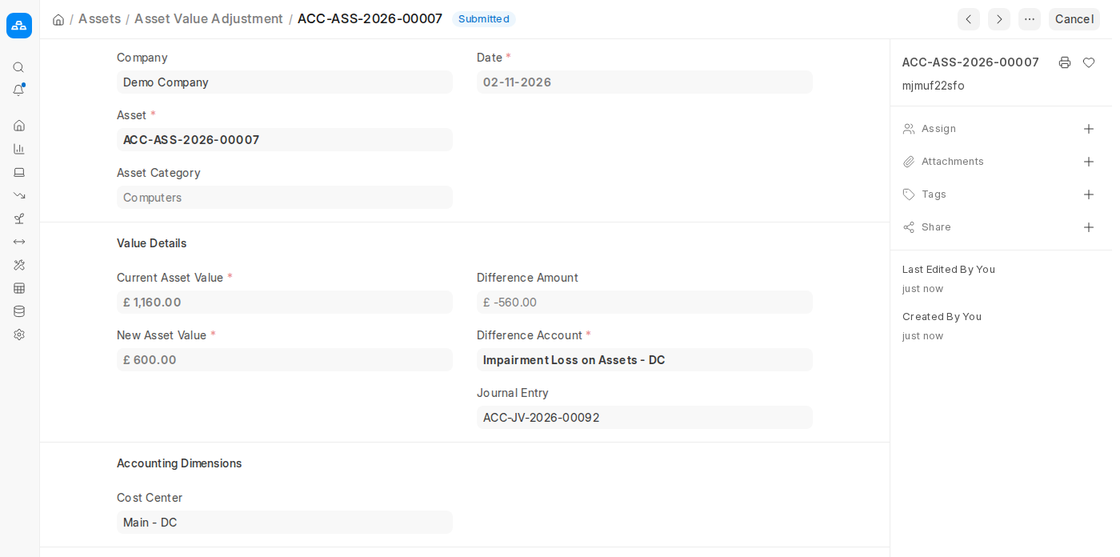
On submission, a related Journal Entry is prepared to realign the book value of the asset. When the value goes down, the journal entry debits the Difference Account and credits the asset’s Fixed Asset Account. When the value goes up, the entries are reversed. The remaining depreciation schedule is then recalculated from the new value.
In the example above, the laptop’s value is reduced from £1,160 to £600, so £560 is debited to the Impairment Loss on Assets account and credited to the Electronic Equipment account.