
BOM Stock Report
You can access the BOM Stock Report from:
In ERPNext v16 this report is called BOM Stock Analysis. Open it by searching for BOM Stock Analysis in the search bar.
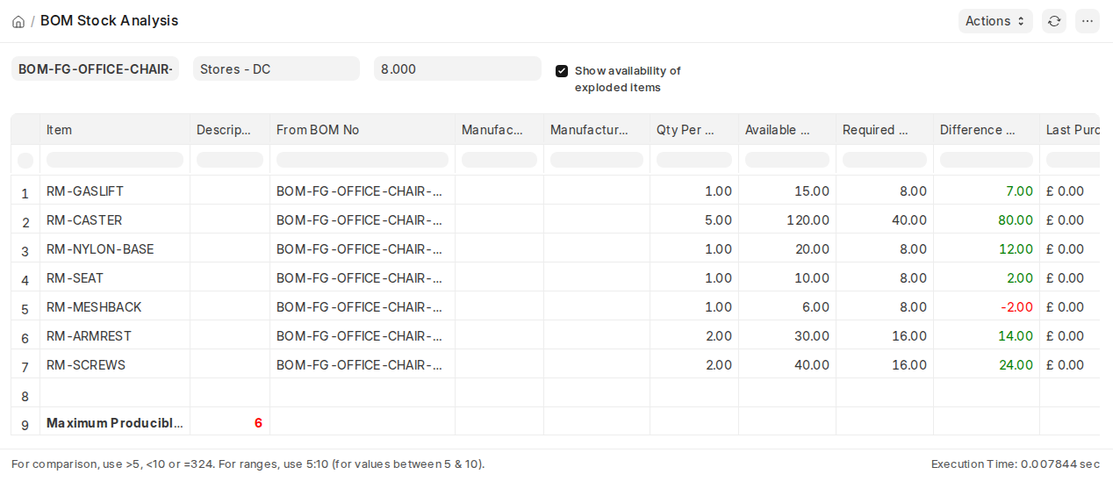
The BOM Stock Report gives in-depth visibility into the readiness of raw materials needed to produce a particular item as outlined in its Bill of Materials. This report contrasts the quantity of each raw material needed (based on the BOM) with the stock held in the warehouse chosen in the filter.
Major functionalities are:
- Required Quantity vs. Actual Quantity: The report shows the total amount of each Component required to produce the selected amount of the finished product and against the actual stock in the selected warehouse.
- Products painted in green show that there is adequate stock present to cover the required amount to produce.
- Items highlighted in red represent low stock, which means there needs to be a procurement or transfer activity prior to producing.
- Warehouse Filter: The user is allowed to choose the particular warehouse where the availability of stock needs to be checked. This is effective for companies having more than one storage facility.
- Qty to Make and exploded items: Enter the quantity you plan to produce and tick Show availability of exploded items to check the raw materials inside sub-assemblies.
- Maximum Producible Items: The last row shows how many finished items can be made with the stock currently in the warehouse.