
Downtime Analysis
To view the Downtime Analysis report, visit:
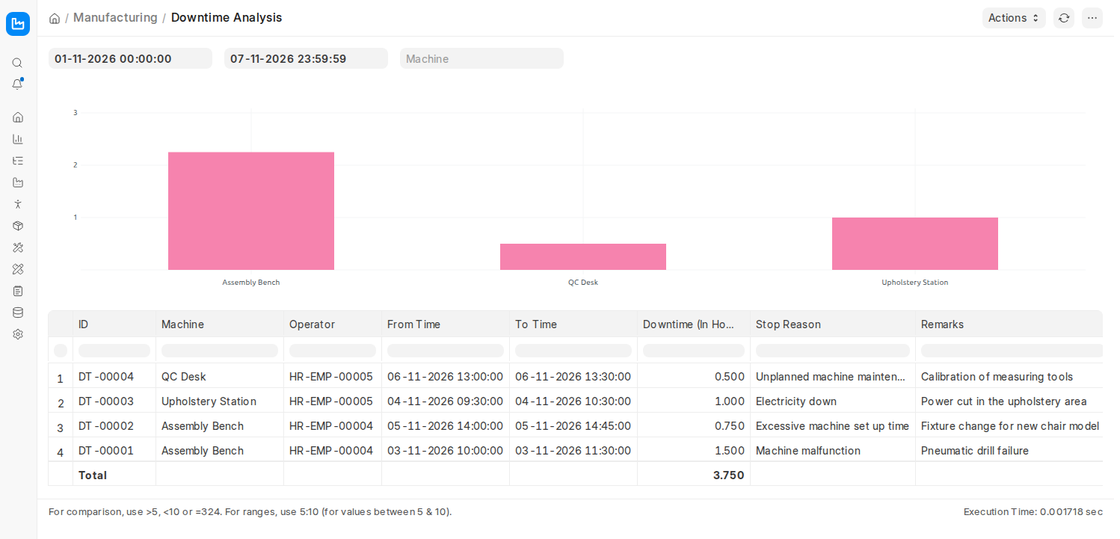
This report gives a concise overview of machine downtime recorded in the system by using the Downtime Entry document. The downtime is expressed in hours, listed per Downtime Entry with the machine (Workstation), operator, from and to time, stop reason and remarks, and shown in a chart of total downtime per machine. It allows production supervisors and maintenance personnel to track equipment performance over time.
Based on the Downtime Analysis report, users can pinpoint machines that have been plagued by persistent performance breakdowns or running stops. It aids in decision-making on preventive maintenance, equipment replacement, and process optimization. The report also measures the equipment downtime effect on the efficiency of the general production hence avoid unacknowledged shutdown, and maximization of the manufacturing output.
The filters From Date, To Date and Machine (Workstation) help to focus on a specific period or trouble area to examine more closely.