
Downtime Entry
To enter the Downtime Entry, go to:
Production Forecasting
The Downtime Entry document in ERPNext is utilized for manually entering the time (in minutes) when a machine or workstation is not working. It is important to track the stoppages in production and diagnose common Problems with a given machine.
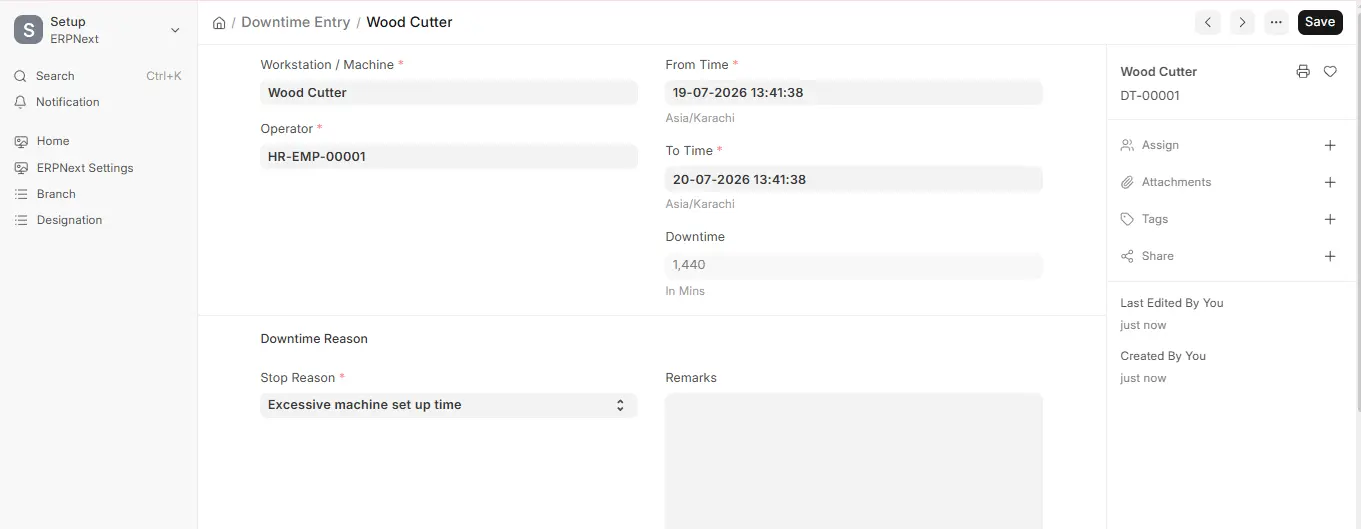
In this mode, users must choose the impacted Machine (Workstation), select the Operator, set the From Time and To Time of the downtime (the Downtime in minutes is calculated automatically), and choose the Stop Reason (e.g., unplanned machine maintenance or excessive set-up time). Remarks can be added optionally for extra information.
Once they are saved, this information is included in the manufacturing records and can be calculated to track the performance and reliability of the machines as a function of time. Frequent stoppages of the same machine may indicate the necessity of preventive maintenance or replacement, thus enabling the Production Manager to take better decisions and enhance overall equipment efficiency (OEE).
This feature enhances Production Forecasting by allowing teams to calculate realistic production levels, realign work schedules, and eliminate unplanned delays resulting from equipment breakdowns.

