
Price List
A list of item prices for purchase, sale, or both is called a price list.
ERPNext enables you to use Price Lists to maintain multiple Selling and Buying prices. These come in Handy when you have varying costs for:
- Geographical region (e.g., according to shipping costs)
- Currency
- Specific customers or territories
Multiple prices for an item may be stored in separate Price Lists depending on variables such as customer, currency, region, etc.
Note: ERPNext stores buying and selling prices independently.
To view Price Lists:
Desktop > Selling > Items & Pricing > Price List (also available under Buying and Stock)
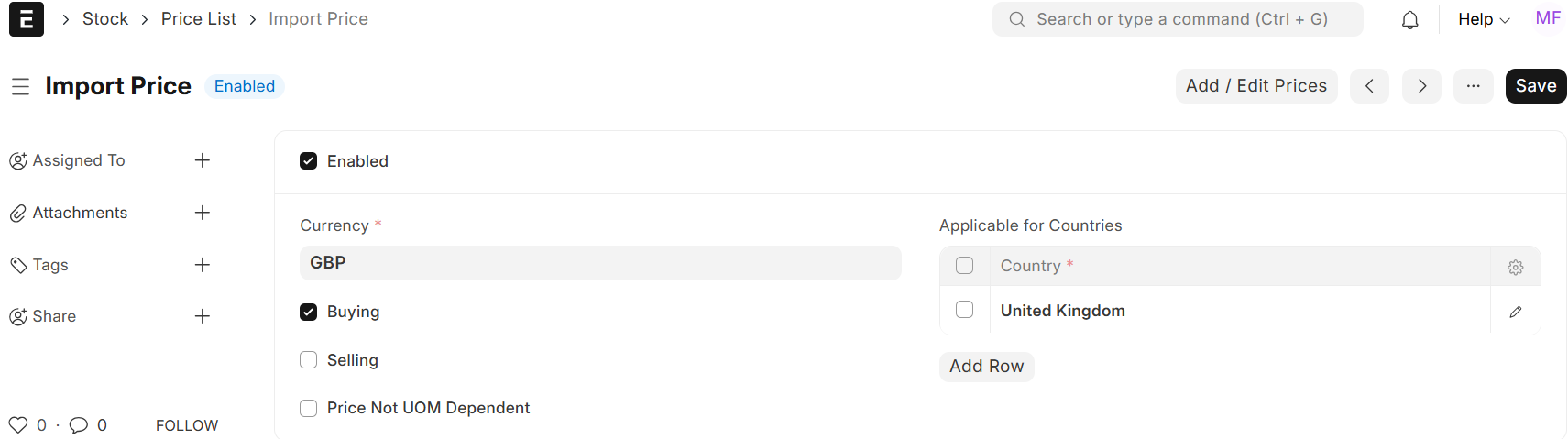
How a Price List Is Used
1. How to Make a Price List:
- Enabled: To make the Price List active, check this box. Disabled lists won’t show up in transactions; uncheck to disable.
- Price List Name: Enter a unique name for the price list, such as “EURO-SELLING-2025”.
- Currency: Choose the currency of the prices in this list (e.g., EUR, GBP).
- Buying / Selling: Tick Buying if the list is used in purchase transactions, Selling if it is used in sales transactions, or both.
- Price Not UOM Dependent: Tick to ignore Unit of Measure conversions (see example below).
- Applicable for Countries: Optionally add the countries in which this price list can be used. Leave the table empty to allow it everywhere.
2. Price Is Independent of UOM
- Unchecked (Default): Price adjusts based on UoM.
- Example: Tomatoes at 10/KG. 1 Box = 10 KG → System calculates 10 × 10 = 100 per Box.
- Checked: Fixed price regardless of UoM.
- Example: $100 per Box, even if Box = 10 KG. System charges 100.
3. Many Price Lists:
Create a separate Price List for each combination you need, for example:
- EUR Selling: Selling = ✔, Currency = EUR, Country = Germany
- Import Price: Buying = ✔, Currency = GBP, Country = United Kingdom
Default Price Lists for buying and selling are auto-created during ERPNext setup.
Note:
- Price lists can be automatically applied to transactions by assigning them to Customers/Suppliers.
- Item Prices created under a price list use the currency of that price list.