
Stock Reposting Settings
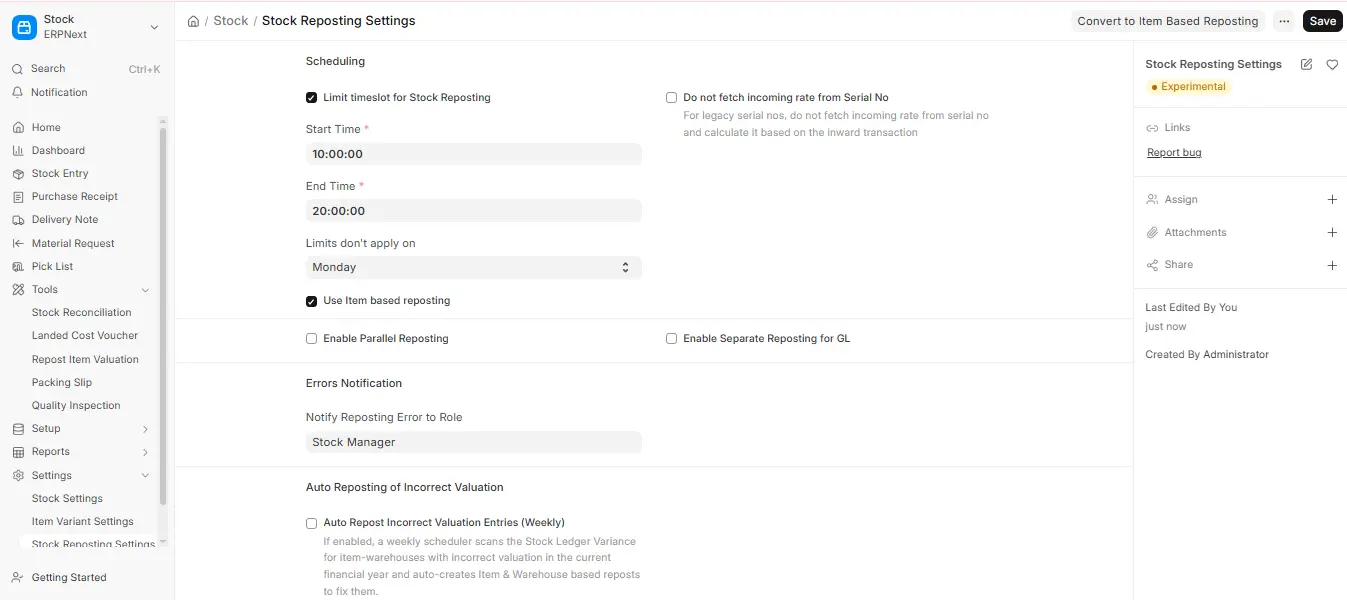
Limit timeslot for Stock Reposting
If you wish to run Stock Reposting Settings during a specified time window, tick this box. When reposting during peak working hours, this helps prevent deadlock problems.
Limits don’t apply on
Select a day of the week on which reposting can happen all day. It’s particularly helpful on weekly breaks or during non-working hours. Any timeslot limits you have set are superseded by this.
Use Item based reposting
By avoiding duplicate Item and Warehouse combinations, this Stock Reposting Settings speeds up the reposting process. System performance is enhanced by preventing needless reposting of the same entries.
Enable Parallel Reposting
Available when Item based reposting is on. It reposts several items at the same time (set the number in No of Parallel Reposting (Per Item)), which speeds up large reposts. In v16 you can also tick Enable Separate Reposting for GL, and Auto Repost Incorrect Valuation Entries (Weekly). The older “Do Reposting for Each Stock Transaction” option is not available in v16.
Notify Role of Reposting Error
System Managers typically receive failure emails from the system if reposting doesn’t work. By selecting this option, you can set up a particular Role to get error messages instead. All users assigned to that role will receive notification from the system.
Useful Note
- The process of reposting requires a lot of processing power, particularly if your system contains thousands or even tens of thousands of stock entries.
- Limiting backdated entries to no more than one month is advised.
- Reposting entries that are more than a month old may not succeed because
- Time constraints: The task may be delayed if reposting is only allowed during non-working hours.
- Timeouts: reposting can take up to 1500 seconds, but high volumes may take longer.
- Inconsistencies: Vouchers may momentarily display inaccurate stock values as a result of delayed reposting.
To preserve stock accuracy, use stock reposting sparingly and only when necessary.

