
Employee
A person working part-time or full-time on a contract of employment, and enjoying recognized rights and obligations of your company, is your Employee. You can manage the Employee master in Frappe HR. It records the demographic, personal, and professional information, join and leave information, etc., of the Employee.
To access the Employee master, go to:
1. Prerequisites
Before making an Employee, it is recommended to make the below:
2. Steps to make an Employee
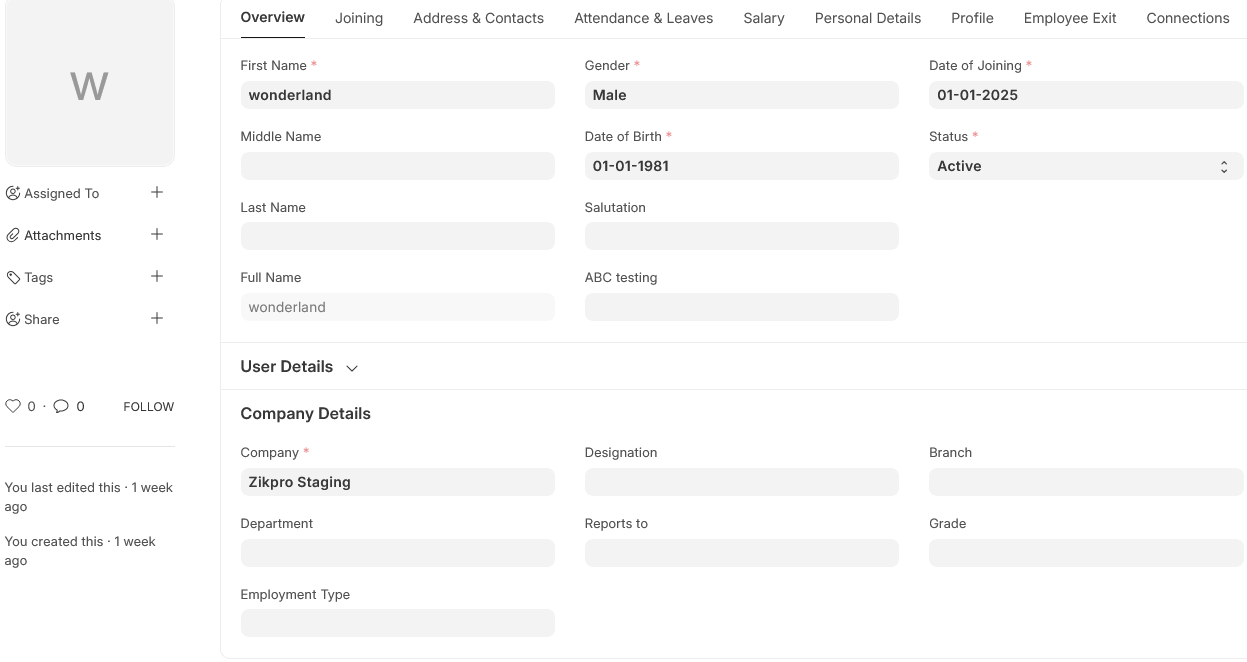
Navigate to the Employee list, and click on New. Fill in the Employee’s personal info like Name, Gender, Date of Birth, and Date of Joining. Save. As illustrated below, all the fields required are indicated by red asterisks.
3. Features
Other than the above mandatory Information, there are some other information that can be recorded in the Employee master as below:
3.1 Employment Type
You have the option to add an Employment Type like Intern, Contract, Full-time, Part-time, Probation, etc. for an Employee.
3.2 Create User
The User ID may be assigned to the Employee. If the User ID is not yet created, you may click on ‘Create a New User’ from the dropdown to create a new one.
By marking the ‘Create User Permission’ checkbox, the Employee’s access to other records can be limited. Refer to Adding Users for how to create users and add permission.
3.3 Joining Details
The Joining Details of the Employee like the Offer Date, Confirmation Date, Contract End Date, Notice (Days), and Date of Retirement can be recorded.
3.4 Department and Grade
In a firm, the Employees are generally categorized on the basis of Department, Grade, Designation, and Branch.
In the Department and Grade field, these details of the Employee can be stored. In the ‘Reports to’ field, the individual to whom the Employee needs to report his responsibilities to can be stored.
3.5 Leave Details
In Leave Details, the Leave Policy and Holiday List details can be saved. Leave Policy determines the nature and quantity of leaves an Employee can get, and Holiday List is a list which has the holiday dates and weekly offs.
3.6 Salary Details
Here, the payment mode of salary, i.e. through Bank, Cheque or Cash can be chosen.
3.7 Contact Details
Employee Contact information like Mobile Number, Permanent and Current Address, Company and Personal Email ID can be recorded here. Either the the Company Email, Personal Email or Employee User ID can be chosen in the Preferred Email ID field as per the choice of the user.
3.8 Personal Details
Employee Personal Details such as Family Background information like parent, spouse and children name and occupation, Passport details like date and place of issue, Health information like height, weight, allergies and medical issues, etc. can be stored.
3.9 Educational Qualification
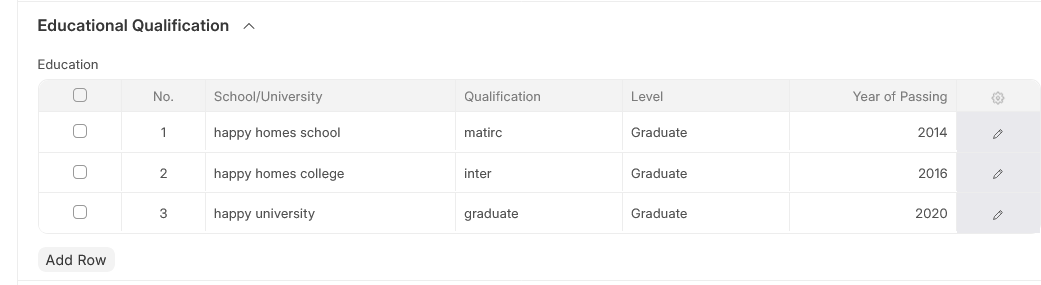
In this, the Educational information like School/University, Qualification, Level and Year of Passing of the Employee can be stored as follows:
Also, information like Class/Percentage and Subjects can be stored by clicking on the downward arrow in the Education table.
3.10 Previous Work Experience
Similar to Educational Qualification, an Employee’s Previous Work Experience can also be stored in the External Work History table as below:
3.11 Previous Work Experience
Besides, information like Contact of the former company and Total Experience in years can also be stored in the External Work History table.

3.12 Exit
Exit information of the employee (if any) like Resignation, Exit Interview and Leave Encashment information can be stored. While the status of the Employee is being made ‘Left’, it is required to enter the Relieving Date.
Note: As soon as the Employee status is changed to ‘Left’, that specific Employee master will not be available in subsequent transactions.
4. Extra Features
Certain extra features that are included in the Employee master are as follows:
Emergency Contact Health Insurance Personal Bio History in the Company

