
Shareholder
In ERPNext, a Shareholder is anyone, including a person, company, or institution, who owns shares in a Company. Shareholders are the real owners of the business. When the business does well, it makes money (through higher stock prices), and when it does poorly, it may lose money. In accounting, shareholders are a liability because they own the profits and losses.
ERPNext provides features to:
- Maintain a properly organized list of shareholders.
- Track share transfers, balances, and folios.
- Prepare reports like Share Ledger and Shareholding Summary.
A Naming Series like “ACC-SH-2025-00001” assigns to each shareholder a “Shareholder ID.” A Folio Number is created automatically for shares on issue.
1. How to Create a Shareholder
- Navigate to Desktop > Accounting > Share Management > Shareholder
- Click on New.
- Enter the shareholder’s name.
- Enter your Address and Contact Details.
- Save the document.
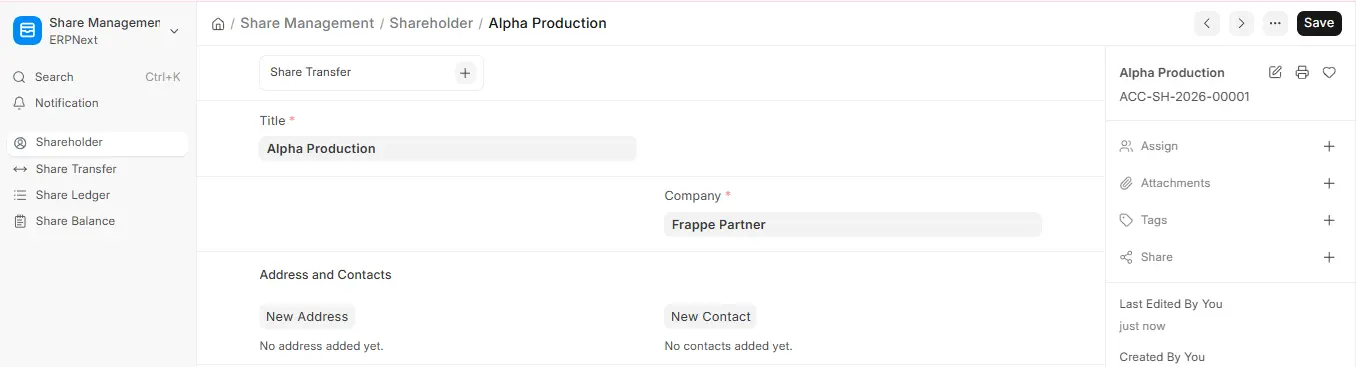
1.1 Names and Addresses
ERPNext maintains contacts and addresses distinct, and thereby you can associate more than one address and contact with the same shareholder. This provides companies dealing with institutions or a group of investors with more flexibility.

