
Bank Clearance
Businesses can keep track of checks or payments that have been sent or received but have not yet been cleared by the bank, thanks to ERPNext’s Bank Clearance feature. The system immediately records the transaction in the company’s books when a Payment Entry (receipts or payments) or a Journal Entry for a bank account is posted. However, it might take some time for the amount to appear on the bank statement.
As soon as they appear in the bank account, you can mark these as cleared using Bank Clearance. This minimises discrepancies in reconciliation between the company’s books and the actual bank statement.
How to Use Bank Clearance
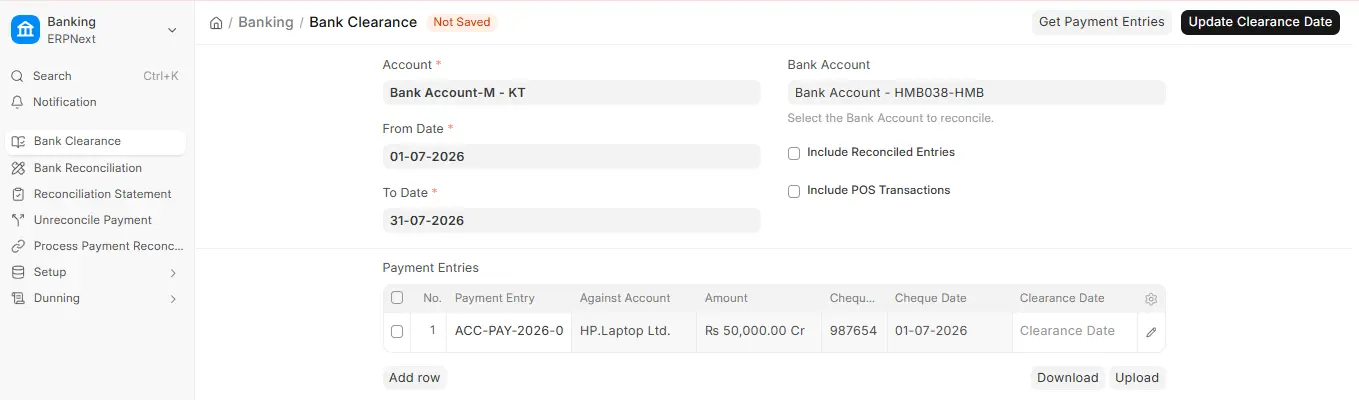
- Go to Accounting > Banking > Bank Clearance
- Select the bank Account (and, optionally, the Bank Account) you want to reconcile, with a From Date and To Date, and click Get Payment Entries.
- A list of the journal entries and payment entries linked to that bank account will be shown.
- After the transaction shows up on the bank statement, confirm the Clearance Date.
- Click Update Clearance Date. Bank Clearance is a tool, so there is nothing to submit.
Note: This Procedure only modifies the clearance status for reconciliation; it does not produce new GL Entries.

