Customer Ledger Summary
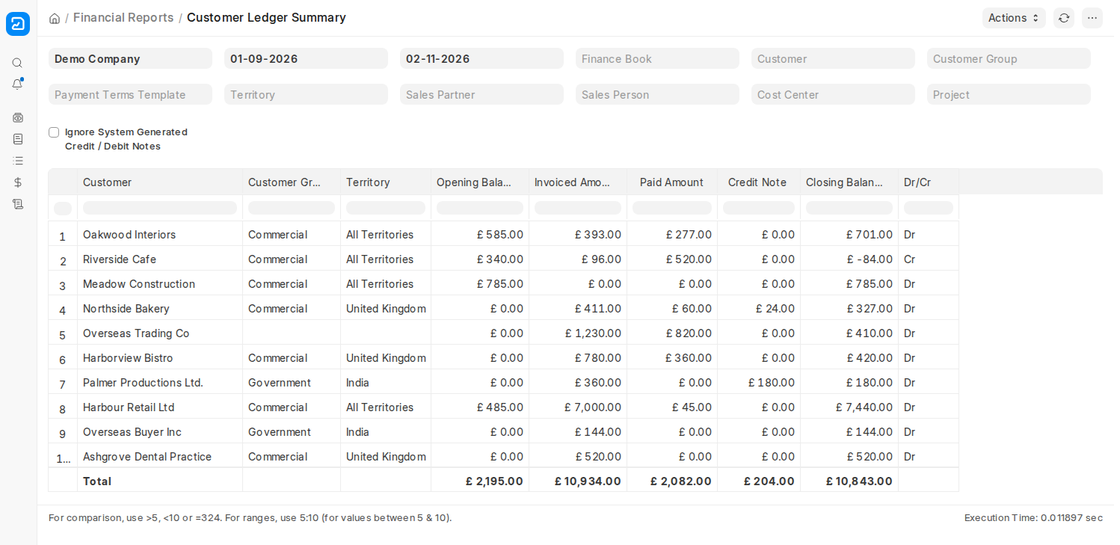
A financial report in ERPNext, named the Customer Ledger Summary, gives a complete picture of all your transactions with your customers (debtors) for the chosen period. It is the main instrument of accounts receivable reconciliation, unpaid balance tracking, and keeping your books accurate.
1. Main Purpose:
To show, for each customer, the opening balance, the amounts invoiced, paid and credited, and the closing balance for the selected period.
2. Accessing the Report:
Go to:
Desktop > Accounting > Financial Reports > Ledgers > Customer Ledger
3. Filters and Features
The filters at the top of the report provide a lot of flexibility.
The most important filters are:
- Company: Choose the organization whose report you wish to see.
- From Date & To Date: Enter the date range for which you would like to view the transactions.
- Customer: Enter details about a particular customer or leave it blank to view all customers.
- Customer Group: Apply a specific group to the customers to narrow down the customers (e.g., Wholesale Customers, Retail Customers).
- Finance Book, Payment Terms Template, Territory, Sales Partner, Sales Person, Cost Center and Project: Narrow the report to the customers and transactions you need.
- Ignore System Generated Credit / Debit Notes: Leaves out the credit and debit notes that ERPNext creates automatically, for example for exchange rate differences.
4. The columns of the report
The columns shown in the report are:
- Customer, Customer Group and Territory.
- Opening Balance: The amount the customer owed at the start of the period.
- Invoiced Amount: Sales invoices posted in the period.
- Paid Amount: Payments received in the period.
- Credit Note: Sales returns and credit notes in the period.
- Closing Balance: Opening Balance + Invoiced Amount – Paid Amount – Credit Note.
- Dr/Cr: Dr means the customer owes you money; Cr means you owe the customer (for example an advance received).
5. Key Features
- One line per customer: Gives a quick summary of each customer’s movement within the selected time range, with totals at the bottom.
- Drill down: For voucher-level details of a customer, open the General Ledger or Accounts Receivable report filtered by that customer.
- Reconciliation: Compare the closing balance with the customer’s statement to make sure your books agree.